
Features |
| – Users can deploy applications like WordPress and WooCommerce with a single click |
Pros | ✅Great for businesses that need scalability | |
Cons | ❌Uses a proprietary control panel, which might be unfamiliar to users accustomed to cPanel. | ❌ Cloudways can be more expensive |
Ease of Use | – More complex, with a steeper learning curve. |

Choosing a web hosting service can feel overwhelming. When I set up my website, I spent a considerable amount of time comparing different options.
Two names that kept popping up were Cloudways and DreamHost. Both are popular, but they have their unique features and benefits.
Cloudways is known for its flexibility and performance. It offers managed cloud hosting, which means it handles the technical aspects for you. This can be a big help if you’re not a tech expert.
On the other hand, DreamHost is a well-established name in the hosting world. It offers shared hosting, VPS hosting, and additional services, making it suitable for a wide range of needs. DreamHost also has a strong reputation for customer support and affordability.
In this comparison, I’ll break down the key differences between Cloudways and DreamHost to help you decide which is the best fit for your website.
Cloudways vs DreamHost 2026: Which One Is Right for You
Cloudways Overview

Cloudways is a platform used for managing multiple hosting platforms, serving as a base for development teams to build, deploy, scale, and manage the applications used on websites.
This platform aims to simplify the hosting experience, empowering individuals, their businesses, and their teams.
High performance standards are established to enable people to make informed choices while maintaining agility and simplicity in every process.
An innovative approach backs up Cloudways. The platform is built on best–of–breed technology and infrastructure providers that help lead the industry, creating smooth and managed cloud hosting experiences.
All this is achieved by investing in the right talent and assembling the ideal teams.
DreamHost Overview

DreamHost, a web hosting provider and domain name registrar, is owned by the New Dream Network.
DreamHost offers VPS as well as dedicated hosting, which utilizes a network of web servers including Nginx, Lighttpd, and Apache, typically running on Ubuntu operating systems.
It also offers cloud storage and computing services that are useful for entrepreneurs and developers.
The control panel, which is available to users and useful for managing all services, is a customized application designed in–house. It includes a support ticket system and integrated billing.
The DreamHost staff makes a big contribution to customer support and the official blog. Although they don’t provide call–in support from the system, the customers receive callback support if needed from the support staff.
Features Battle: Cloudways vs DreamHost
Cloudways Features
One-Click Deployment and Staging Environments
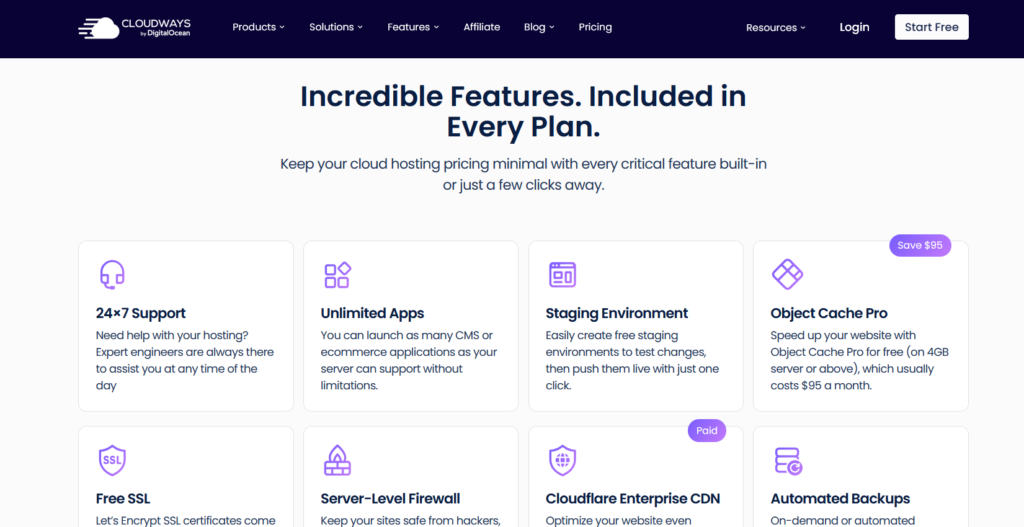
Cloudways simplifies the process of launching new applications with its one-click deployment feature. Users can quickly deploy applications and set up staging environments to test changes safely before pushing them live. This capability streamlines development workflows, making it easier to manage updates, perform testing, and roll back if necessary without impacting the live site.
Built-in Caching and CDN Integration
To enhance website performance, Cloudways integrates built-in caching mechanisms through the Breeze plugin and offers seamless integration with Cloudflare’s Content Delivery Network (CDN). Caching reduces server load and speeds up response times by storing copies of frequently accessed content. The CDN further accelerates content delivery by distributing it across global edge servers, decreasing latency, and improving site availability for visitors worldwide.
Automated Backups and SSL Certificates
Cloudways offers automated daily backups to protect user data and ensure rapid recovery in the event of accidental data loss or other issues. Additionally, free SSL certificates are offered via Let’s Encrypt, enabling secure HTTPS connections for websites. These features enhance security, foster user trust, and facilitate compliance requirements without requiring additional manual setup.
Advanced Security Features
Security is a priority on Cloudways, which offers multiple layers of protection. Two-factor authentication adds an extra security step during login to prevent unauthorized access. Cloudways also implements firewalls to control traffic, provide bot protection, and mitigate Distributed Denial of Service (DDoS) attacks powered by Cloudflare. Together, these measures help safeguard websites from common cyber threats and maintain uptime.
24/7 Expert Support
Cloudways provides round-the-clock expert support via live chat and a ticketing system. Users can receive assistance whenever they encounter technical difficulties, configuration questions, or need guidance managing their cloud infrastructure. Continuous access to knowledgeable support ensures minimal downtime and smooth operations, especially for users without in-house server expertise.
DreamHost Features

Management Tools
DreamHost’s custom control panel is designed for ease of use, allowing users to manage domains, emails, and website settings efficiently without the need for third-party control panels. Their AI-powered website builder, Liftoff, helps users quickly create and maintain websites with minimal technical knowledge. The platform also offers a Business Advisor tool that provides personalized insights and recommendations to help users grow their online presence.
Security Features
Security is a key focus at DreamHost, with automatic installation and renewal of free SSL certificates through Let’s Encrypt to ensure encrypted connections. The platform includes built-in DDoS protection and malware scanning to guard against common web threats. Users can also enable multi-factor authentication to add an extra layer of account security, safeguarding sensitive information and controlling access to the control panel.
Performance and Reliability
DreamHost guarantees 100% uptime, backed by a robust Service Level Agreement (SLA) to ensure websites remain accessible around the clock. Their infrastructure comprises strategically located data centers in Oregon, Virginia, and Amsterdam, enabling them to serve global audiences efficiently. The platform provides built-in traffic analytics tools that allow users to monitor visitor behavior and site performance, helping identify potential bottlenecks or issues.
Email and Collaboration
Most DreamHost hosting plans include free professional email hosting, enabling users to create custom email addresses associated with their domains. For businesses that require enhanced collaboration capabilities, DreamHost integrates seamlessly with Google Workspace, providing tools such as Gmail, Google Drive, and Calendar to improve productivity.
Pros and Cons: Cloudways vs DreamHost
Cloudways Pros and Cons
Pros
- User-friendly and intuitive dashboard for easy management
- Managed hosting optimized for PHP applications like WordPress, WooCommerce, and Magento
- One-click deployment and staging environment setup for streamlined development
- Flexible pay-as-you-go pricing with both hourly and monthly billing options
- Built-in caching and CDN integration for faster website performance
Cons
- Does not provide domain registration services; domains must be purchased separately
- No email hosting included; requires an external email service provider
DreamHost Pros and Cons
Pros
- 100% uptime guarantee backed by a solid SLA
- Free domain registration is included with many plans
- Scalable VPS and cloud hosting for growing websites
- Free professional email hosting with most plans
- AI-powered website builder simplifies site creation
- Additional professional services like marketing and custom development are available
Cons
- Some backup features may incur extra charges depending on the plan
- Customer support response times can vary, occasionally slower during busy periods
Pricing Battle: Cloudways vs DreamHost
Cloudways – Pricing


| Plan | Price (USD per month) | Hourly Rate (USD) | RAM | vCPU | NVMe Storage | Transfer Bandwidth | Visits | Websites |
|---|---|---|---|---|---|---|---|---|
| Micro | $14 | $0.0208 | 1GB | 1 | 25GB | 1TB | Unlimited | Unlimited |
| Small | $28 | $0.0417 | 2GB | 1 | 50GB | 2TB | Unlimited | Unlimited |
| Medium | $54 | $0.0804 | 4GB | 2 | 80GB | 4TB | Unlimited | Unlimited |
| Large | $99 | $0.1473 | 8GB | 4 | 160GB | 5TB | Unlimited | Unlimited |
DreamHost – Pricing
| Plan Type | Price (USD) | Ideal For | Key Features |
|---|---|---|---|
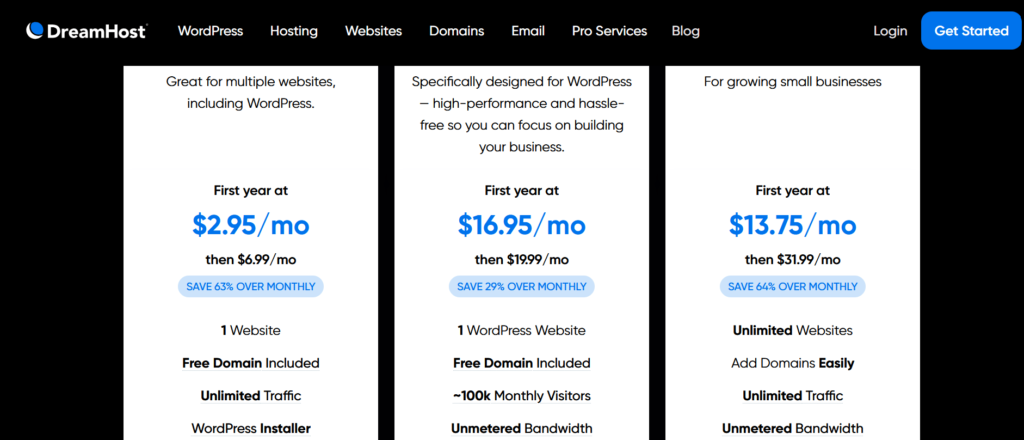
| WordPress Basic | $2.59/month (3-year plan) | Beginners and personal blogs | Free domain, unlimited traffic, free SSL, 1 website, WordPress pre-installed |
| DreamPress | $16.95/month (1-year plan) | Small to medium businesses | Managed hosting, built-in caching, CDN, staging, daily backups, email support |
| VPS for WordPress | $10/month (3-year plan) | Developers and growing sites | Isolated resources, root access, 1 website, free SSL, unlimited traffic |
Notes:
- The prices mentioned are promotional rates and may be subject to renewal at higher rates after the initial term.
- Free domain registration is included with certain plans, subject to specific terms and conditions.
- Additional services, such as email hosting and website migration, are available at an extra cost.
FAQs
Is there a provision of an SSL certificate?
Well, forget all your worries now! Cloudways is equipped to satisfy all its users, so there is an apparent provision of an SSL certificate known as Let's Encrypt SSL. The best part is that it is completely free, saving your expenditure!
Would I be finding any additional charges apart from the obvious server cost?
Rest assured, there are no hidden fees. Cloudways is quite transparent. Additional reimbursements have to be expended on backup storage. Yes, suppose you have endorsed the paid add-ons. In that case, there will be additional expenses imposed.
✨ Is it actually possible to undertake DreamHost services before signing up?
Unfortunately, there is no provision of a demo account. Don't worry at all! If the services provided by DreamHost aren't up to your expectations, there is the 97 days refund program.
Quick Links:
- GoDaddy vs HostGator vs Bluehost
- SiteGround vs HostGator vs Bluehost
- Bluehost vs HostGator
- Best GoDaddy Alternatives
- Nexcess vs Bluehost
- Cloudways vs Bluehost
Conclusion: Cloudways vs DreamHost 2026
In my experience, Cloudways emerges as a better option for individuals who have the resources and willingness to acquire technical knowledge or already possess a certain level of expertise.
With Cloudways, you can dive into the intricacies of your website, and the free trial allows you to explore its features without restrictions.
On the other hand, DreamHost is an excellent choice for those who prefer a hassle-free experience and do not want to invest time learning technical skills.
It provides comprehensive solutions that address various challenges, making it a convenient one-stop solution for hosting needs.
Using both platforms, I found that Cloudways offers more flexibility and customization options, while DreamHost has certain limitations.
Ultimately, the choice between the two depends on your specific requirements and comfort level with technical aspects.
