

Instapage is a landing page builder that helps users create high-converting landing pages quickly. It offers drag-and-drop functionality, customizable templates, and advanced analytics, making it easy to design and optimize pages
- Easy drag-and-drop editor
- Customizable templates
- Built-in A/B testing
- Integrates with various marketing tools
- Fast page loading times
- Expensive pricing plans
- Learning curve for advanced features
Price: $97/Month
If you’re in the business of online marketing, digital sales, or advertising, you know that landing pages play a crucial role in driving conversions.
That’s where Instapage comes in. But what exactly is Instapage, and why is it considered one of the best tools for creating landing pages?
In this comprehensive review, I’ll walk you through everything you need to know about Instapage, its features, pricing, performance, and how it compares to other similar platforms.
What is Instapage?
Instapage is a comprehensive, cloud-based platform designed specifically for creating high-converting landing pages. It caters to marketers, businesses, and agencies by offering an intuitive drag-and-drop builder that allows users to design landing pages without any coding knowledge.
Instapage’s main goal is to simplify the process of creating pages that are optimized for conversion, which is crucial in online marketing.
The platform offers a wide variety of customizable templates, so users can quickly build pages that suit their specific needs, whether for product launches, lead generation, or special offers.
Beyond just building landing pages, Instapage provides tools for A/B testing, which lets users test different versions of their landing pages to determine which performs best.
It also integrates with numerous third-party tools like Google Analytics, email marketing platforms, and CRM systems, ensuring that your landing pages fit seamlessly into your existing marketing ecosystem.
Additionally, Instapage offers features such as dynamic text replacement for personalized content, mobile optimization, and conversion analytics to track performance.
All of this combined makes Instapage an ideal solution for anyone looking to maximize the effectiveness of their landing pages and improve their overall conversion rates.
Who is Instapage for?
Instapage is ideal for:
- Marketers looking to create highly converting landing pages without relying on developers.
- Small to medium-sized businesses that want to scale their marketing efforts without complex tools.
- Agencies that handle multiple clients and need a simple way to build, test, and optimize landing pages.
- Entrepreneurs and E-commerce businesses that want to boost conversion rates with optimized landing page designs.
Instapage Pricing Plans
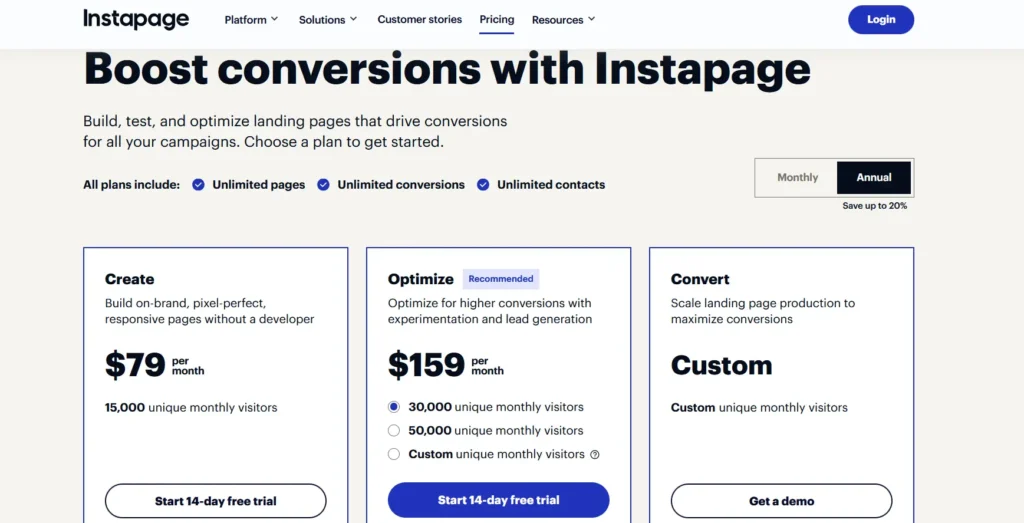
| Plan Name | Monthly Price (USD) | Unique Monthly Visitors | Key Features |
|---|---|---|---|
| Create | $99 ($79 with annual billing) | 15,000 | Drag-and-drop builder, reusable page blocks, real-time visual collaboration, triggered popups and sticky bars, AI content generation |
| Optimize | $199 ($159 with annual billing) | 30,000 | All “Create” features plus server-side A/B testing, hypothesis setting, customizable traffic splitting, scheduling, multi-step forms, dynamic text replacement |
| Custom | Custom pricing | 50,000+ | All “Optimize” features plus enterprise-grade compliance and security, ad-to-page personalization, global blocks and forms, root domain publishing, heatmaps, direct lead bypass |
My Personal Experience with Instapage
What truly set Instapage apart, however, was the A/B testing feature. I’ve always known how important it is to test different landing page elements, but in the past, I found it cumbersome to set up tests and track results.
With Instapage, A/B testing is built right into the platform. I could quickly create different versions of a page, test various elements like headlines and CTAs, and see which one resonated best with my audience. This data-driven approach helped me optimize my campaigns and increase conversions.
Additionally, I was impressed by the analytics dashboard. It provides a comprehensive overview of each landing page’s performance, including conversion rates and bounce rates.
The fact that everything is in one place means I didn’t have to jump between tools to get insights about how my pages were performing. This made optimizing my landing pages both easier and more efficient.
Finally, mobile optimization was another standout feature. Instapage ensures that all pages are responsive, meaning they look and perform well across devices.
Considering how much traffic now comes from mobile, this feature is invaluable, and I didn’t have to manually tweak anything to ensure my landing pages would look good on smartphones or tablets.
Why I Recommend Instapage
- Speed: The platform is incredibly fast, both in terms of loading times for the pages and the ease of use when designing them.
- A/B Testing: This feature helped me significantly increase the performance of my campaigns.
- Mobile Optimization: Instapage automatically adjusts your landing pages for mobile, which is essential in today’s market.
- User-Friendly Interface: Even if you’re not a designer or developer, you’ll find the platform easy to use.
Overall, my experience with Instapage has been nothing short of positive. It streamlines the process of creating, testing, and optimizing landing pages, which ultimately allows me to focus on what matters most delivering effective marketing campaigns.
Core Features of Instapage
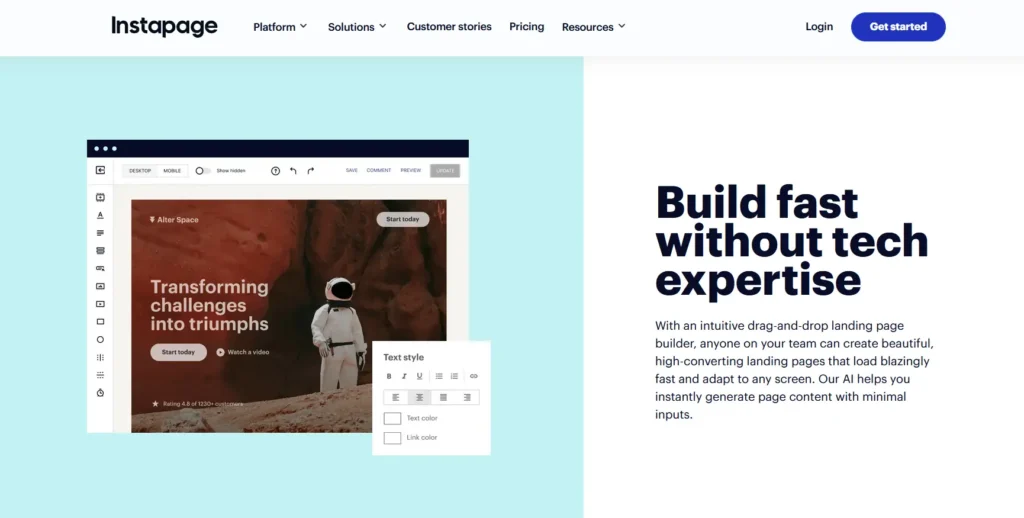
1. Drag-and-Drop Builder
The drag-and-drop builder is perhaps the most important feature of Instapage. It allows users to design landing pages without any coding knowledge. You can simply drag elements like text blocks, images, videos, forms, buttons, and other widgets into place, and arrange them however you like. The builder is incredibly user-friendly, with an intuitive interface that makes the page design process quick and seamless. Whether you’re creating a landing page for a special offer, an event, or a lead-generation form, you have full creative control without needing a developer.
Benefits:
- Fast and easy page creation without coding skills.
- Intuitive interface that saves time and effort.
- Flexibility to customize every aspect of your page.
2. A/B Testing
A/B testing is one of Instapage’s standout features. With this tool, you can create multiple versions of your landing page and test them against each other to see which version performs best. You can test different headlines, images, copy, and even call-to-action buttons. Instapage allows you to easily set up and run A/B tests, making it simple to experiment and optimize your pages for maximum conversions.
Benefits:
- Helps improve conversion rates by identifying the best-performing page versions.
- Eliminates guesswork and ensures data-driven decisions.
- Test different variations of content to see what resonates with your audience.
3. Dynamic Text Replacement (DTR)
Dynamic Text Replacement (DTR) is a feature that personalizes landing pages based on incoming traffic. It allows you to automatically change the text on your landing page to match keywords or search terms used in your ads, search engines, or URL parameters. This means that if someone clicks on a paid ad for “discount shoes,” the headline of your landing page can dynamically change to reflect that specific search term, making it more relevant to the visitor.
Benefits:
- Increases relevance and engagement by personalizing content for each visitor.
- Improves conversion rates by delivering more targeted messaging.
- Ideal for paid campaigns where ad text matches landing page content.
4. Conversion Analytics
Conversion analytics in Instapage allows you to track the performance of your landing pages in real-time. You can measure key metrics such as conversion rates, bounce rates, form submissions, and even the time visitors spend on your pages. This data helps you understand what’s working and what needs improvement, giving you the insights you need to refine your campaigns and increase conversions.
Benefits:
- Provides data-driven insights into the effectiveness of your landing pages.
- Allows you to track and optimize metrics like conversion rate and bounce rate.
- Helps identify areas of improvement and optimization.
5. Mobile Optimization
All of Instapage’s landing page templates are mobile-responsive, ensuring that your pages look great and function smoothly on mobile devices. With mobile traffic accounting for a large portion of online users, this feature is essential. Instapage automatically adjusts the layout of your pages to ensure that they’re mobile-friendly, without requiring any additional design work.
Benefits:
- No need for manual adjustments to make pages mobile-friendly.
- Ensures your pages provide an excellent user experience on smartphones and tablets.
- Increases conversions by catering to mobile users, a crucial demographic.
6. Collaborative Features
Instapage includes collaborative features that make it easy for teams to work together on landing page projects. Multiple users can collaborate in real-time, leave comments, assign tasks, and track changes, all from within the platform. This feature is particularly useful for agencies or businesses with larger teams, as it ensures that everyone is on the same page and can contribute efficiently to the landing page creation process.
Benefits:
- Facilitates teamwork and streamlines the landing page creation process.
- Allows for real-time feedback and collaboration, making revisions easier.
- Ideal for agencies and larger teams handling multiple campaigns.
7. Integrations with Marketing Tools
Instapage integrates seamlessly with a variety of third-party tools and platforms, including CRM systems like Salesforce, email marketing platforms like Mailchimp, and analytics tools like Google Analytics. These integrations allow you to connect your landing pages with your existing marketing stack, making it easier to track performance, capture leads, and automate follow-up tasks.
Benefits:
- Easily integrates with popular tools to enhance your marketing efforts.
- Streamlines workflows and reduces manual data entry.
- Helps sync leads and contacts directly to your CRM.
8. SEO Capabilities
Instapage offers built-in SEO capabilities, such as customizable meta tags, title tags, and descriptions for each landing page. These features allow you to optimize your pages for search engines, helping improve their visibility and ranking. By following basic SEO best practices, you can drive more organic traffic to your landing pages and generate leads without relying solely on paid ads.
Benefits:
- Helps increase organic traffic through improved search engine ranking.
- Customizable SEO settings for each page, including meta tags and URLs.
- Enhances the long-term visibility of your landing pages.
9. Lead Capture Forms
Lead capture forms are easy to add and customize in Instapage. These forms enable you to collect visitor information, including names, email addresses, and phone numbers, which can then be automatically synced with your CRM or email marketing tools. You can use these forms to generate leads, sign up subscribers, or collect feedback, depending on your business needs.
Benefits:
- Simple lead generation process with customizable forms.
- Automates the capture and storage of contact information.
- Perfect for building email lists, collecting customer data, and growing your audience.
10. Templates Library
Instapage provides access to an extensive library of customizable templates for different types of landing pages, from event promotions to product launches to lead-generation forms. These templates are designed to be conversion-optimized, meaning they are structured to help you achieve higher engagement and conversion rates. Whether you need a simple page or something more complex, Instapage has a template that fits your needs.
Benefits:
- A vast collection of professionally designed templates to suit any campaign.
- Ready-to-use designs that save you time and effort in the creation process.
- Conversion-focused templates that increase the likelihood of achieving campaign goals.
Pros and Cons of Instapage
Pros
- User-Friendly: The drag-and-drop builder makes creating pages a breeze, even for beginners.
- A/B Testing enables you to optimize landing pages for improved conversion rates with ease.
- Excellent Analytics: Provides detailed data that helps you improve your campaigns.
- Fast Load Times: Instapage is optimized for speed, which is crucial for user experience and SEO.
- Responsive Design: Automatically adjusts pages for mobile devices.
Cons
- Pricing: The higher-tier plans can be expensive, especially for small businesses.
- Limited on Low-Tier Plans: The Core plan lacks some advanced features like dynamic text replacement and advanced integrations.
Performance & Usability of Instapage
Instapage offers exceptional performance and usability, making it a top choice for creating high-converting landing pages. The platform is optimized for fast loading times, which is crucial for keeping bounce rates low and ensuring a smooth user experience. Pages load quickly, even during high traffic surges, thanks to Instapage’s reliable infrastructure, which also guarantees high uptime and scalability.
Whether you’re running a small campaign or handling larger-scale traffic, Instapage ensures that your landing pages will perform seamlessly.
In terms of usability, Instapage is incredibly user-friendly. Its drag-and-drop builder makes it easy for users of all skill levels, whether you’re a beginner or an experienced marketer, to design and customize landing pages without any coding knowledge.
The intuitive interface allows users to quickly add and arrange elements like text, images, buttons, and forms, and the platform’s extensive template library further simplifies the process.
Additionally, Instapage automatically optimizes pages for mobile, ensuring they look great across devices without extra effort. The platform also supports real-time collaboration, making it ideal for teams to work together efficiently on landing page projects.
Overall, Instapage strikes an excellent balance between high performance and ease of use, providing marketers with a reliable and efficient tool to create effective landing pages.
Customer Support Offered by Instapage
Instapage offers excellent customer support through multiple channels, including email, live chat, and an extensive knowledge base. Response times are quick, and the support team is knowledgeable and friendly.
If you’re looking for even more personalized help, you can opt for their Enterprise plan, which comes with a dedicated account manager.
Live Chat Support
Instapage offers live chat support to all users through the application. The live chat is available 24 hours a day, Monday to Friday, starting at 1 AM UTC on Monday and ending at 1 AM UTC on Saturday. During these hours, users can access live chat by clicking the Help button in the page builder or dashboard. If the automated support bot doesn’t resolve the issue, users can initiate a live chat conversation or submit a ticket for further assistance. Please note that there may be brief periods when live chat is unavailable due to holidays or internal reasons.
Ticket-Based Support
For issues that require more detailed attention or fall outside live chat hours, users can submit a support ticket. Tickets can be submitted by clicking “Leave a message” in the application or by sending an email to [email protected]. The typical first response time for tickets is one working day. While support is limited during weekends and holidays, the team strives to address all requests promptly.
Enterprise-Level Support
Enterprise clients have access to enhanced support services. This includes a 24/7 emergency support line, ensuring that critical issues are addressed promptly. Additionally, enterprise users can expect a response from the support team within one hour for urgent matters.
Self-Service Resources
Instapage provides a comprehensive Help Center that offers a wealth of self-service resources, including articles, tutorials, and FAQs. These resources cover a wide range of topics, from account management to advanced features, allowing users to find solutions to common issues independently.
Community Engagement
Instapage also encourages community engagement through its blog and resource library, where users can access case studies, webinars, and best practices. This platform allows users to learn from each other and stay updated on the latest trends and strategies in landing page optimization.
Instapage’s support system is designed to cater to a wide range of user needs, from immediate assistance through live chat to in-depth guidance via self-service resources.
Whether you’re a new user seeking help with basic features or an enterprise client requiring urgent support, Instapage strives to provide the necessary tools and assistance to ensure a seamless experience.
Instapage Summary
Here’s a quick summary table based on customer ratings:
| Feature | Rating (Out of 5) |
|---|---|
| Good Value for Money | 4.5 |
| Features | 5 |
| Return Policy | 4 |
| Shipping & Delivery | N/A |
| Customer Service | 5 |
| Price & Quality | 4.5 |
| Ease of Use | 5 |
Frequently Asked Questions (FAQ)
What is Instapage used for?
Instapage is a landing page builder designed to help businesses and marketers create, optimize, and analyze landing pages for lead generation, sales, and marketing campaigns.
Do I need coding skills to use Instapage?
No, Instapage is designed for users without coding experience. Its drag-and-drop editor makes it easy to build landing pages without any technical knowledge.
Is Instapage mobile-friendly?
Yes, all landing pages created with Instapage are automatically optimized for mobile devices. You can also make mobile-specific adjustments if needed.
What is A/B testing in Instapage?
A/B testing in Instapage allows you to create multiple variations of a landing page and test them against each other to see which version performs better in terms of conversions.
Is there a free trial available?
Yes, Instapage offers a 14-day free trial for new users to explore its features and determine if it suits their needs.
Quick Links:
- Jungle Scout Pricing
- Squarespace Pricing Plans
- ViceTemple Pricing
- Wix Ecommerce Pricing
- MemberPress Free Trial
Final Thoughts on Instapage
For those looking to take their marketing efforts further, Instapage’s A/B testing and conversion analytics features are invaluable. These tools help you fine-tune your landing pages based on real data, ensuring that every campaign performs at its best.
Additionally, the platform’s mobile optimization ensures your pages look great and function smoothly across all devices, which is a must in today’s mobile-first world.
While Instapage can be a bit pricier compared to some alternatives, the investment is justified by its robust features, fast performance, and reliable customer support. For businesses aiming to boost conversion rates and streamline landing page creation, Instapage is an excellent choice.
If you’re serious about growing your online business and improving your marketing performance, Instapage is a tool worth considering. Its flexibility, scalability, and optimization features make it an invaluable asset in the world of digital marketing.
