Managing multiple WordPress websites is a burdensome job for all the website owners. But it cannot be ignored because this is the only way to maintain a strong foothold in the digital market space. Although WordPress has made it easy for the website administrators to develop and manage all kinds of websites, when it comes to managing multiple websites, the developers feel reluctant. There are various challenges that most of the developers face while maintaining multiple sites, such as:
If you are finding the solution and want to conquer the difficulties of managing multiple websites, then you are on the right page. This article covers varied tools that offer a way to manage multiple websites with a single dashboard. To find out more about these tools, let’s have a glimpse below:
InfiniteWP is a superbly designed tool that comes with a framework, from where the website administrators can manage the unlimited websites. With the help of this tool, the users can updates themes, plugins, and other features of all the sites with one click. It is a ready-to-go tool that does not require any kind of difficult configuration.
Moreover, it comes with powerful admin panel that lets the users have an eye on all the websites. There is a seamless backup solution, where the users can manage the backup of the entire data brilliantly. This comes with a self hosted and secure platform. Here, the users can control all the data and deploy different queries within the server. Thus, it is highly secure.
The most important thing is, it is cost-effective because some features like maintaining back-up and updating theme are available for free.
WPREMOTE is a user-friendly tool that allows the users to monitor and update unlimited websites on a single screen. With one click, the users can implement the updated themes and plugins of different websites at a same time. This tool uses single API keys in order to ensure that only the authorized users can log in to use the features. Additionally, this API key also makes it easy for the developers to log in because the users do not need to remember the password and id.
WPREMOTE supports different hosting partners so that the website owners have varied options to choose desirable hosting service. This tool comes with JSON based API that makes it convenient for integrating every feature of the tool with the existing domain.
MainWP is a user-friendly tool that comes with a feature-rich admin panel. Here, the website administrator has the power to manage different posts, themes, plugins, and many more features of multiple sites at the same time. It does not support encrypted code; therefore, you can see that what is happening inside the network.
MainWP supports varied extensions to control various features including, Security, Backup, content, and other features. MainWP can easily integrate all the WordPress websites and provides a single dashboard to control the multiple sites at the utmost ease. This tool comes with various features that ease content management, for example, you can schedule the blog post for different sites.
Additionally, it comes with superb security functions that enable the web administrators to scan the websites and fix the errors (if any in the code). Apart from this, there are lots of backup functionalities that help you maintain backup.
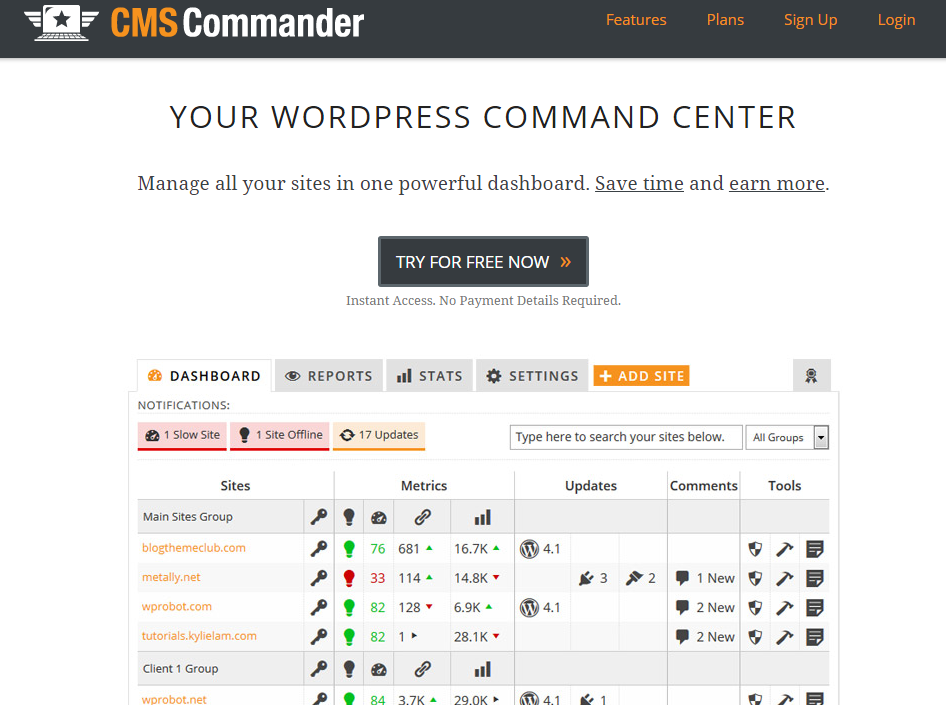
CMS Comander is a superbly designed framework that lets you manage more than one sites simultaneously. It is equipped with high-end monitor that enables the users to check backlink, traffic, and other aspects of different websites so that you can optimize all the sites to gain the top most rank in the search engine result.
There is an automatic backup system that empowers the users to keep all the data of different websites secure and organized. Here, with one click, the users can update the content for different websites simultaneously. Moreover, installing different plugins for different sites is piece of cake.
Along with this, CMS Comander comes with a set of amazing functions such as quick log in, seamless backup management, etc. All these features empower the administrator to smoothly maintain all the sites and boost the productivity.
ManageWP is a “complete WordPress administration comfort” for WordPress clients who need to securely and productively oversee various sites. Whether you’ve got two WordPress locales to oversee or 500, ManageWP can help you continue everything upgraded, moved down, secure, and significantly more. All from one dashboard.
Closing Thought
The approach to control multiple websites from a single admin panel or dashboard is highly productive and time-saving. Thus, if you are using multiple WordPress sites then, you should think of these tools as early as possible. This will bring a lot of benefits to the table and even optimize the way to maintain a strong foothold in the digital scenario.
Choosing the right web hosting service can be confusing, especially with so many options available.…
Deciding between Bluehost, HostGator, and Dreamhost as your web hosts can be a confusing process.…
Ever feel like your mind is too crowded, like there's a party happening in there…
In the fast-evolving landscape of web hosting services, choosing the right provider is crucial for…
DreamHost excels with fast performance, reliable uptime, and robust security features. It’s user-friendly, offering easy…
If you're looking for GoDaddy renewal coupon codes, then you are in the right place.…