GoDaddy VPS Pricing 2026: Compare Plans & Find the Best Value
Last Updated on: November 15, 2026 by Sonia Allan | Fact Checked
Affiliate disclosure: In full transparency – some of the links on our website are affiliate links, if you use them to make a purchase we will earn a commission at no additional cost for you (none whatsoever!).
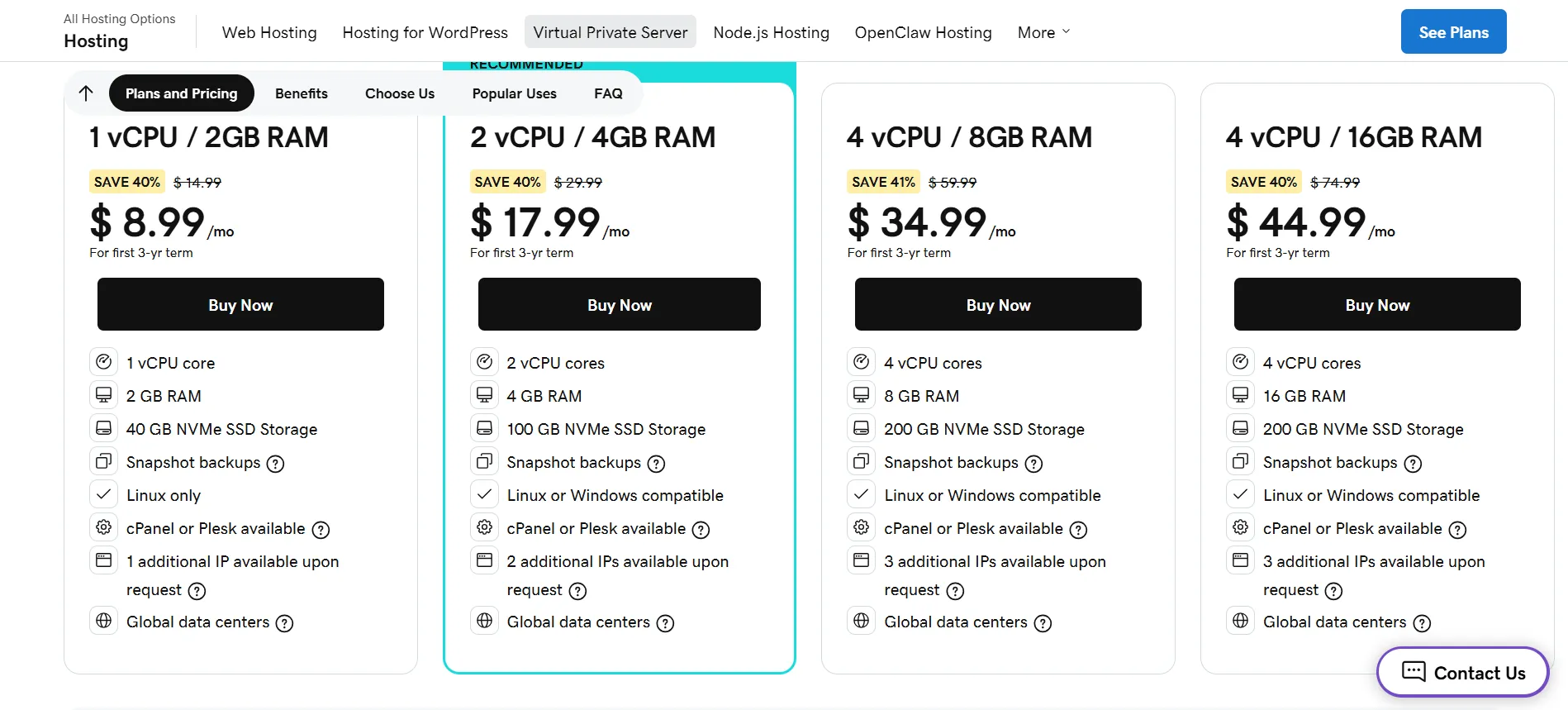
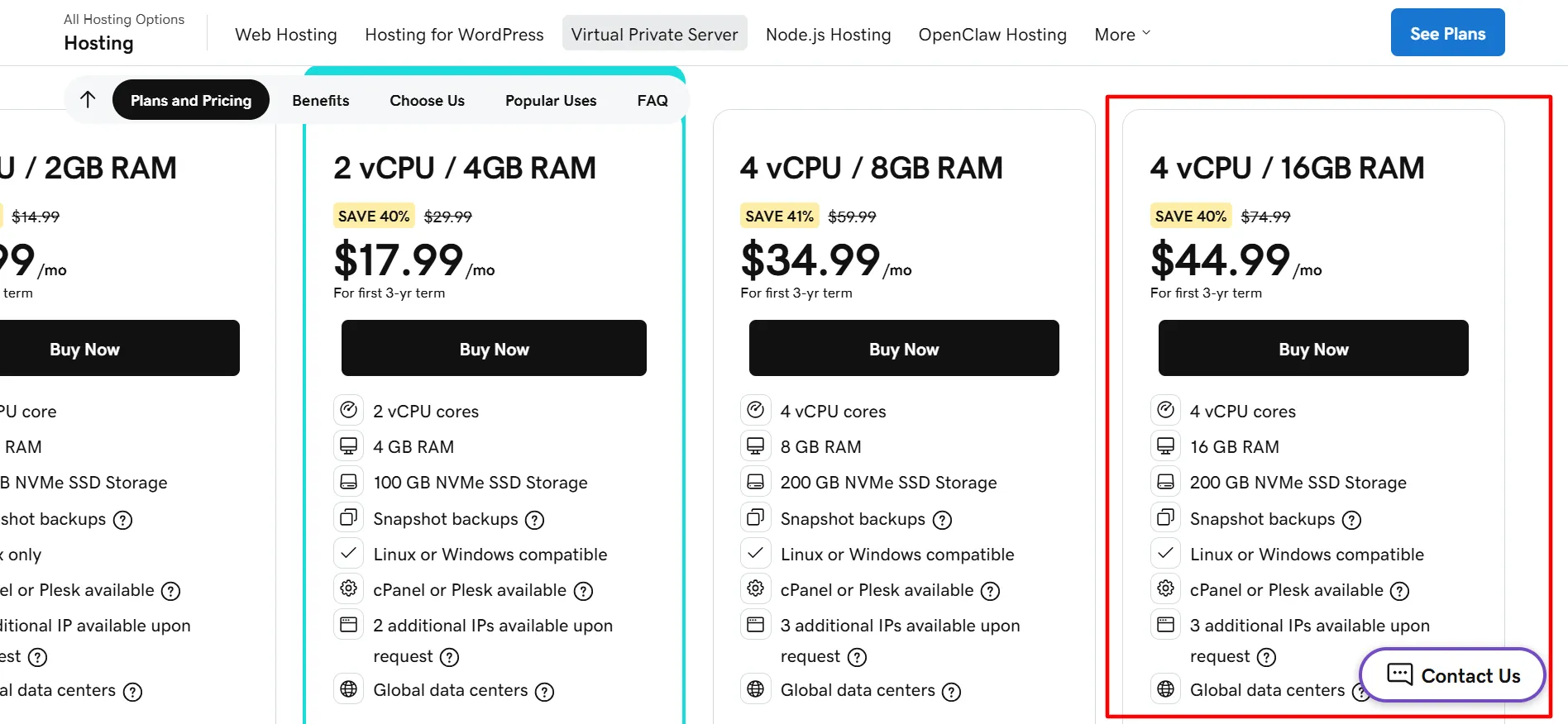
GoDaddy VPS Pricing begins at $8.99/month for the 1 vCPU and 2GB RAM configuration when purchased for the first 3-year term. The current range includes four standard VPS setups, with the highest listed price reaching $44.99/month for 4 vCPU, 16GB RAM, and 200GB NVMe SSD storage. GoDaddy provides KVM virtualization, root access, NVMe storage, snapshot backups, DDoS protection, monitoring, and optional cPanel or Plesk.
GoDaddy VPS hosting is designed for developers, system administrators, agencies, businesses, and website owners who need greater control than shared hosting can provide. The service offers isolated virtual resources, root access, unlimited traffic, multiple global data center locations, and Linux or Windows support on eligible configurations.
GoDaddy VPS Pricing at a Glance
VPS Plan
Price
vCPU
RAM
NVMe SSD
Operating System
1 vCPU / 2GB RAM
$8.99/month
1
2GB
40GB
Linux
2 vCPU / 4GB RAM
$17.99/month
2
4GB
100GB
Linux or Windows
4 vCPU / 8GB RAM
$34.99/month
4
8GB
200GB
Linux or Windows
4 vCPU / 16GB RAM
$44.99/month
4
16GB
200GB
Linux or Windows
These are GoDaddy’s currently displayed USD promotional rates for the first 3-year term. The page also lists regular reference prices of $14.99, $29.99, $59.99, and $74.99 per month, representing discounts of around 38% to 41%.
Latest GoDaddy VPS Pricing 2026
The latest GoDaddy VPS Pricing options start at $8.99/month and extend to $44.99/month across the four standard configurations. Each displayed promotional rate applies to the first three-year term.
GoDaddy also advertises higher-resource VPS configurations reaching up to 32 vCPU cores, 128GB RAM, and 1.5TB NVMe SSD storage.
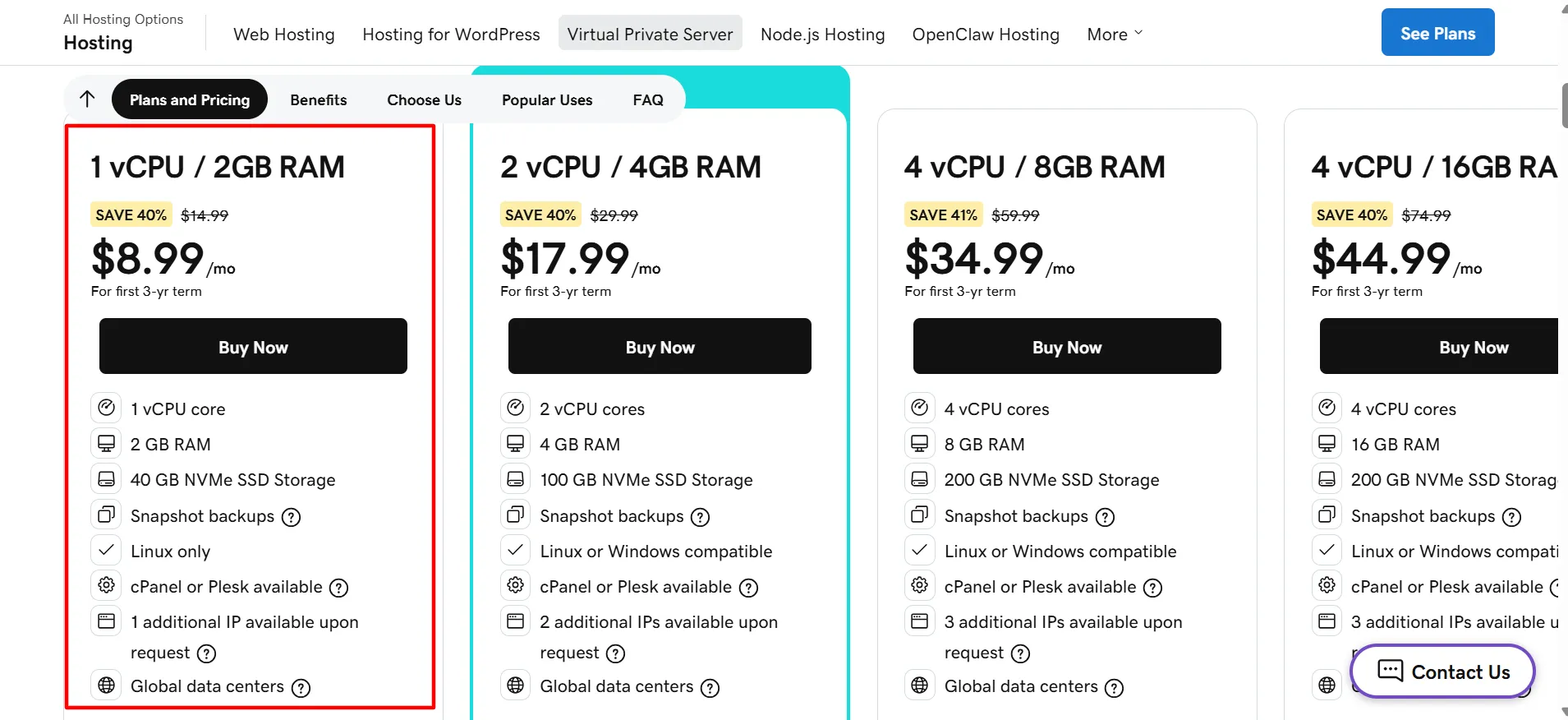
1 vCPU / 2GB RAM Pricing
Price: $8.99/month for the first 3-year term
The 1 vCPU / 2GB RAM configuration is the entry point in GoDaddy’s VPS lineup. It is suitable for smaller websites, development work, testing environments, and applications that require an isolated server with a modest resource allocation.
1 vCPU / 2GB RAM Features
CPU and memory: 1 vCPU core with 2GB RAM.
Storage: 40GB NVMe SSD storage.
Operating system: Linux only.
Server control: KVM virtualization and full root access.
Management: cPanel or Plesk available as an option.
Backup and network: Snapshot backups, global data center choices, and one additional IP available upon request.
The entry configuration also comes with unlimited traffic, 24/7 network monitoring, DDoS protection, and server resource monitoring.
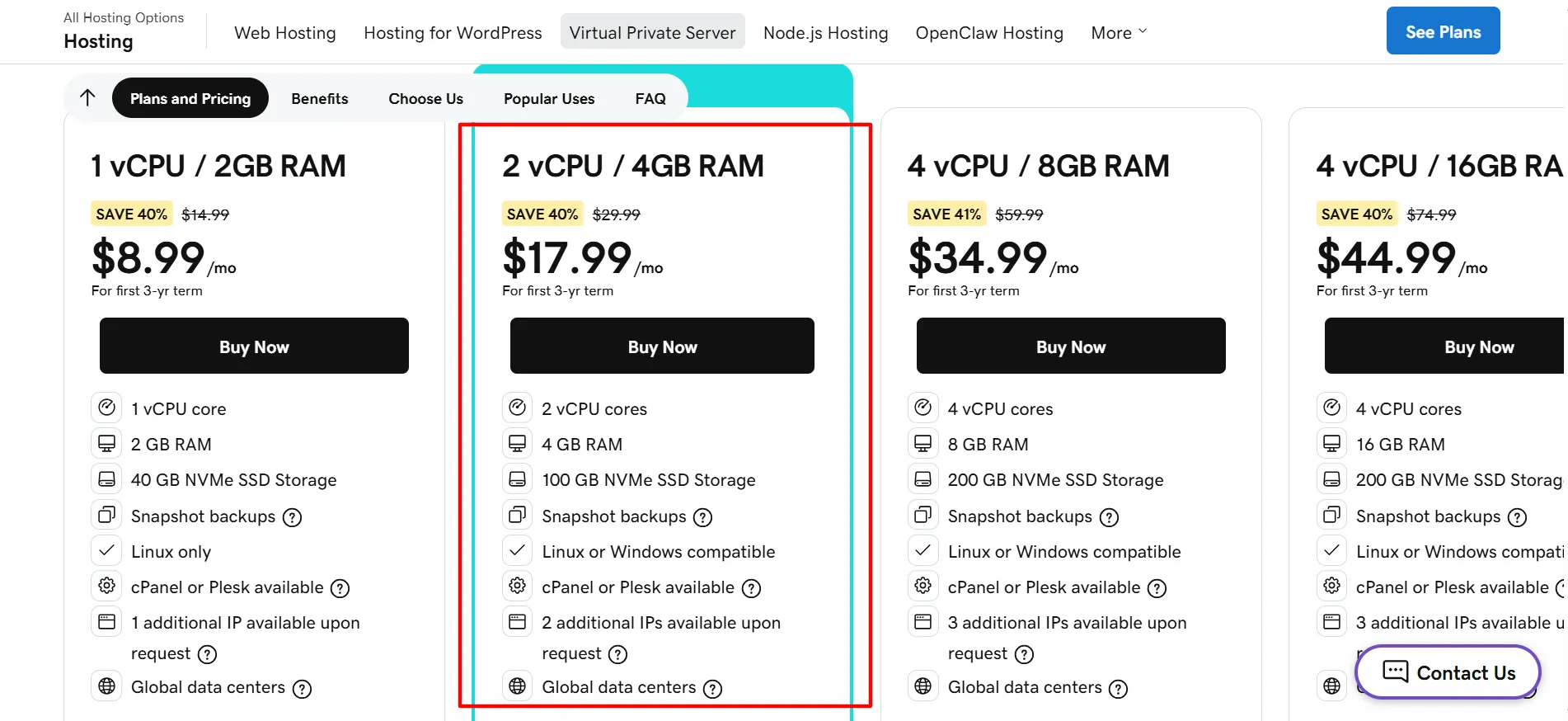
GoDaddy marks the 2 vCPU / 4GB RAM configuration as its recommended VPS option. It doubles the CPU and memory of the entry-level plan, making it more appropriate for business websites and applications with greater resource requirements.
2 vCPU / 4GB RAM Features
CPU and memory: 2 vCPU cores and 4GB RAM.
Storage: 100GB NVMe SSD.
Operating system: Linux or Windows.
Server access: Full root access with KVM virtualization.
Control panels: cPanel or Plesk available.
Backups: Snapshot backups included.
IP addresses: Two additional IPs available upon request.
GoDaddy also offers data center locations across North America, Europe, and Asia-Pacific, allowing customers to select a server location in one of these regions.
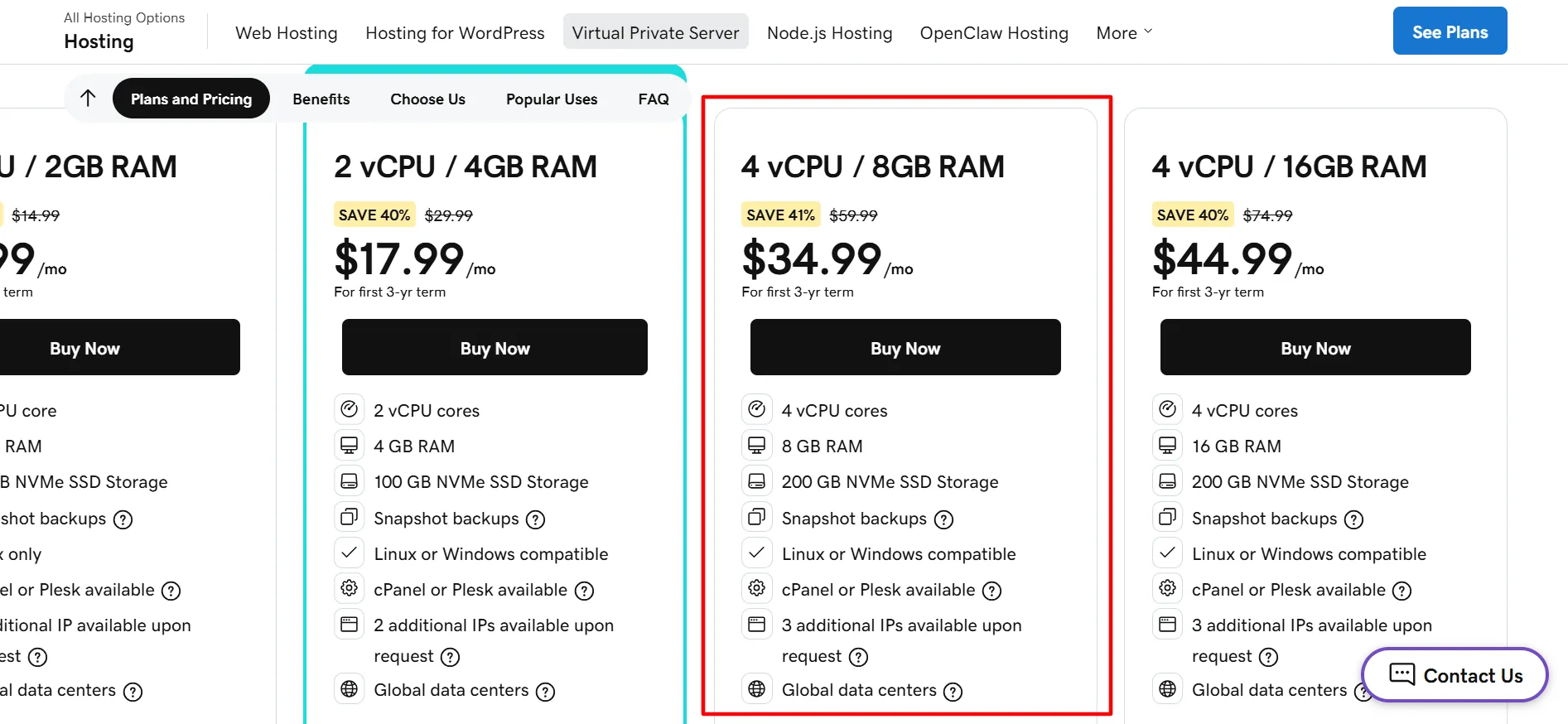
The 4 vCPU / 8GB RAM configuration targets websites and applications requiring additional processing power and memory. It includes 200GB of NVMe storage, making it suitable for larger websites, ecommerce projects, databases, and resource-intensive applications.
4 vCPU / 8GB RAM Features
CPU and memory: 4 vCPU cores with 8GB RAM.
Storage: 200GB NVMe SSD.
Operating system: Linux or Windows.
Virtualization: KVM virtualization with root access.
Control panels: cPanel or Plesk available.
Backups: Snapshot backups included.
IP addresses: Three additional IPs available upon request.
GoDaddy lists ecommerce websites, databases, CRM systems, financial applications, and other resource-heavy applications as common VPS use cases.
The highest standard configuration retains four vCPU cores and 200GB NVMe storage while increasing RAM to 16GB. This setup is better suited to applications that need additional memory without requiring more CPU cores.
4 vCPU / 16GB RAM Features
CPU and memory: 4 vCPU cores and 16GB RAM.
Storage: 200GB NVMe SSD.
Operating system: Linux or Windows.
Server access: KVM virtualization and full root access.
Control panels: cPanel or Plesk available.
Backups: Snapshot backups included.
IP addresses: Three additional IPs available upon request.
This configuration can be useful for larger databases, ecommerce websites, multiple websites, and applications with greater memory requirements.
GoDaddy VPS Hosting combines dedicated server resources with the flexibility of VPS hosting. You get options for CPU, RAM, NVMe storage, and operating systems to match different workloads. The platform also provides root access and server management tools. This gives users greater control over their hosting environment.
1. NVMe SSD Storage
Each of the four standard VPS configurations uses NVMe SSD storage. GoDaddy states that its NVMe storage can provide speeds up to three times faster and supports unlimited traffic.
2. KVM Virtualization
KVM virtualization provides an isolated virtual server environment while giving users control over their assigned CPU, RAM, and storage. GoDaddy also allows customers to increase resources as their requirements grow.
3. Full Root Access
Full root access gives administrators control over server settings, applications, system files, and operating-system configurations. SSH keys and command-line access are also supported.
4. Linux and Windows VPS
GoDaddy supports Linux and Windows VPS hosting. Linux choices include AlmaLinux, Debian, and Ubuntu, while Windows Server options are offered through supported Plesk editions.
5. cPanel and Plesk
Customers can select popular control panels, including cPanel/WHM and Plesk. These graphical interfaces simplify server and website administration for users who prefer not to manage everything through the command line.
6. Backups and Recovery
Automated snapshot backups are included with GoDaddy VPS hosting. The current VPS page states that customers receive 7 days of automated snapshot backups. Users can also create on-demand snapshots and recover their server through the recovery console.
Larger configurations support both operating systems.
GoDaddy advertises unlimited traffic with its VPS hosting.
Available hardware ranges from entry-level VPS setups to higher-resource servers.
Snapshot backups, monitoring, alerts, and DDoS protection are included.
Cons
The advertised rates apply to the first 3-year term.
cPanel or Plesk availability does not mean the license is included at no additional cost.
Is GoDaddy VPS Worth the Price?
GoDaddy VPS Pricing can be a good option when you need more control and isolated virtual resources than shared hosting provides.
The 1 vCPU / 2GB plan provides the lowest entry price and suits smaller projects. For business websites, the 2 vCPU / 4GB plan is a stronger middle-ground option because it doubles CPU and RAM while providing 100GB of NVMe storage.
The 4 vCPU / 8GB plan is better suited to resource-heavy websites, databases, ecommerce stores, and applications. When memory is the bigger requirement, the 4 vCPU / 16GB plan doubles RAM while keeping the same CPU and storage allocation.
GoDaddy can also appeal to users who want Linux or Windows support, root access, KVM virtualization, optional cPanel or Plesk, global data center choices, and managed VPS assistance.
GoDaddy VPS pricing starts at $8.99/month for 1 vCPU and 2GB RAM when purchased for the first 3-year term. The standard configurations currently go up to $44.99/month for 4 vCPU and 16GB RAM.
The 1 vCPU / 2GB RAM VPS is the cheapest current configuration, costing $8.99/month for the first 3-year term. It includes 40GB NVMe SSD storage and Linux support.
GoDaddy advertises unlimited traffic with its VPS hosting service.
cPanel/WHM is offered as an option, as is Plesk. The final price may vary according to the selected control panel and configuration.
Yes. GoDaddy supports Linux and Windows VPS hosting. The 1 vCPU / 2GB configuration is Linux-only, while the larger standard configurations support either Linux or Windows.
Yes. GoDaddy provides automated snapshot backups and currently states that VPS customers receive 7 days of automated snapshot backups, together with on-demand snapshots and recovery tools.
Yes. Full root access is included, allowing administrators to configure the server and operating system through SSH and command-line tools.
GoDaddy advertises configurations reaching 32 vCPU cores, 128GB RAM, and 1.5TB NVMe SSD storage. The public pricing page currently lists four standard configurations, while larger setups are available for higher-resource requirements.
Final Thoughts on GoDaddy VPS
GoDaddy VPS Pricing 2026 starts at $8.99/month for the first 3-year term and reaches $44.99/month for the 4 vCPU / 16GB RAM configuration.
The VPS platform combines NVMe SSD storage, KVM virtualization, root access, unlimited traffic, snapshot backups, DDoS protection, monitoring, and optional cPanel or Plesk. Linux and Windows support also provide flexibility when selecting the server environment.
For smaller projects, the 1 vCPU / 2GB plan offers the lowest initial cost. The 2 vCPU / 4GB configuration provides a balanced choice for many business websites, while the 4 vCPU options are more suitable for workloads that require additional processing power or memory.
Keep one pricing detail in mind: the displayed USD prices are promotional rates for the first 3-year term. GoDaddy currently shows regular reference prices of $14.99, $29.99, $59.99, and $74.99 per month respectively. Review the checkout page for renewal pricing, taxes, control-panel charges, and other applicable add-ons before purchasing.
Hey, I’m Sonia Allen- a freelance content writer and senior SEO analyst at Digiexe, where I geek out over content and data-driven SEO. With seven years of digital marketing and affiliate marketing experience, I love sharing tips on everything from eCommerce to social media. You’ll catch my work on sites like Saasultra.com, and Digiexe.com and SchemaNinja, where I break down big ideas into practical advice. When I’m not writing or tweaking SEO strategies, I’m probably sipping coffee and dreaming up my next project!