
This Omnisend review comes from running it on my own ecommerce projects, where every email has to pay for itself. Omnisend is built for online stores, it has a real free plan, and paid plans start low. I’ll show you what I use, what it costs in 2026, and where it falls short. You can try Omnisend free here while you read.

The easiest email and SMS platform I have used for online stores. Worth it if your store sells online.
✓Pros
- ✓Free plan with core automations
- ✓Email, SMS and push in one flow
- ✓24/7 support on every plan
✕Cons
- ✕SMS only on the Pro plan
- ✕Cost climbs as your list grows
What Is Omnisend? My Omnisend Review in Plain Words
Omnisend is an email, SMS and web push marketing platform made for ecommerce stores, with automations, signup forms, segmentation and sales reports in one dashboard.
I started this Omnisend review because I was tired of email tools that treat a store like a blog. They send pretty emails but don’t understand carts, orders or products. Omnisend does. It pulls product data from your store, tracks what people browse and buy, and triggers messages from those actions.
More than 150,000 brands use it, and it connects with over 355 apps and platforms, including Shopify, WooCommerce, BigCommerce and Wix. The store connection is the heart of the tool: once it’s linked, cart flows, product blocks and revenue reports run on real data.
| Plan | Starting Price | Email Sends |
|---|---|---|
| Pro | $59/mo | Unlimited (fair use) |
| Standard | $16/mo | 12x your list size |
| Free | $0/mo | 500 per month |
What this means: Omnisend is not a general newsletter tool with an ecommerce add on. It’s an ecommerce tool first, and that’s the lens for this whole Omnisend review.
Omnisend Review: Who Should Use It (and Who Should Skip It)?
Omnisend fits online stores that want automated email and SMS sales; it’s a poor fit for bloggers or B2B teams without a product catalog.
I’ve recommended Omnisend to store owners, and I’ve told a few people to pick something else. Here is how this Omnisend review sorts it out:
- Shopify and WooCommerce stores: yes. The store sync, product blocks and cart flows are the main reason to buy it.
- Budget stores: yes. The Omnisend free plan covers the core flows, and Standard starts at $16/mo.
- Brands that want SMS: yes, on the Pro plan. Email, SMS and push live in one automation.
- Bloggers and course creators: usually no. You’d pay for store features you never touch.
What this means: if you sell physical or digital products through a store, Omnisend belongs on your shortlist. If you only send a weekly newsletter, look elsewhere.
Omnisend Features: The Automation Builder I Rely On
The automation builder lets you drag steps, delays, splits and conditions into one visual flow that mixes email, SMS and push messages.
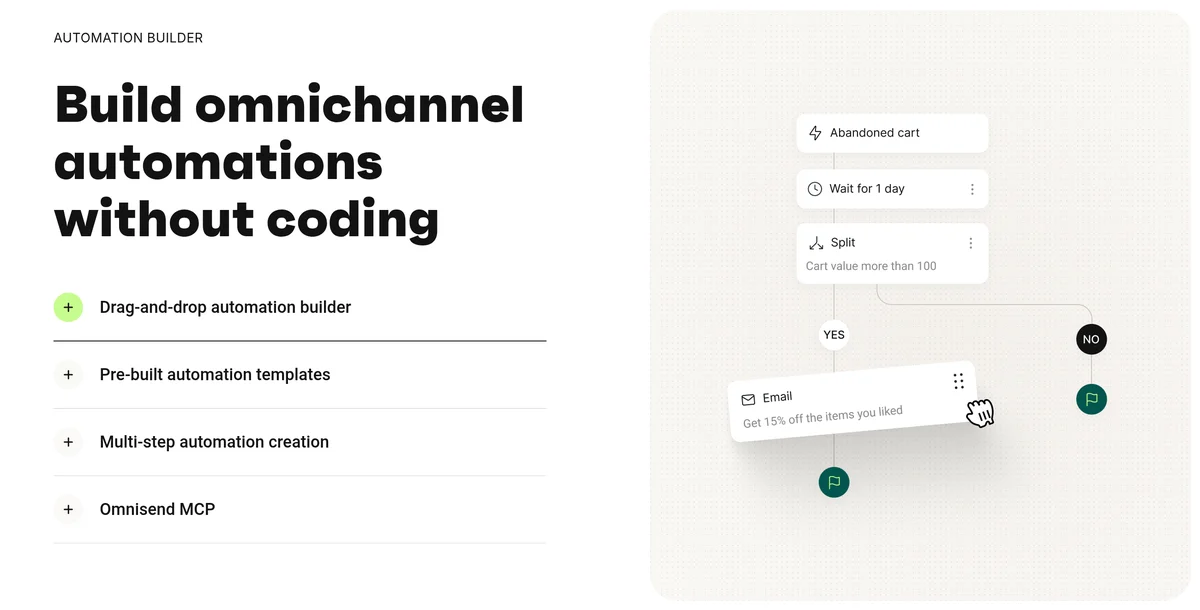
This is the part I’d pay for even if everything else disappeared. On day one I switched on three prebuilt workflows: welcome series, abandoned cart and post purchase follow up. Each comes with sensible timing and ready copy, so I only swapped in my brand colors and the discount.
Later I built custom flows. You can split a flow by order value, treat first time buyers differently, or add an SMS step only for people who opted in to texts.
- Prebuilt workflows: welcome, cart recovery, browse recovery, post purchase and win back are ready to launch.
- Automation splits: send people down different paths based on behavior or customer data.
- A/B testing in flows: compare two emails inside a workflow and keep the winner.
- Per step reports: see opens, clicks, conversions and revenue at every step.
What this means: of all the Omnisend features, the automations do most of the selling. Set them up properly in week one and they keep working while you sleep.
Omnisend Review of the Email Builder and Campaigns
The drag and drop email builder pulls products straight from your store, adds unique discount codes, and helps you write subject lines with built in AI.
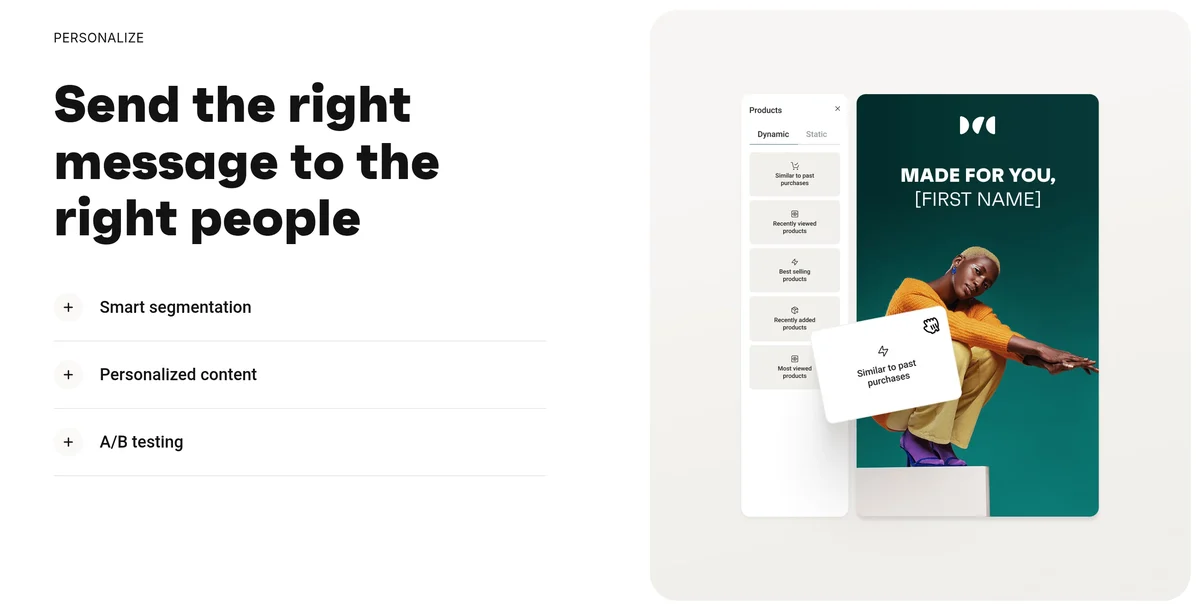
I’m not a designer, which is why I like this builder. I drop in a product block, pick items from my catalog, and the image, price and link come in automatically. The discount block creates unique codes that sync with the store, so one code can’t spread across coupon sites.
A few campaign features I use almost every time:
- Campaign Booster: resends a campaign to people who didn’t open the first one.
- Email A/B testing: test subject lines and sender names before the full send.
- Timezone scheduling: each subscriber gets the email at the chosen local time.
- Custom sender domain: set up SPF and DKIM so your emails look trustworthy to inbox providers.
What this means: in this Omnisend review, the campaign tools are built for selling products, not long letters. For offers, launches and product picks, the builder feels quick.
Signup Forms, Popups and List Growth
Omnisend includes popups, embedded forms, landing pages, teasers, a Wheel of Fortune and multi step forms, so you don’t need a separate form tool.
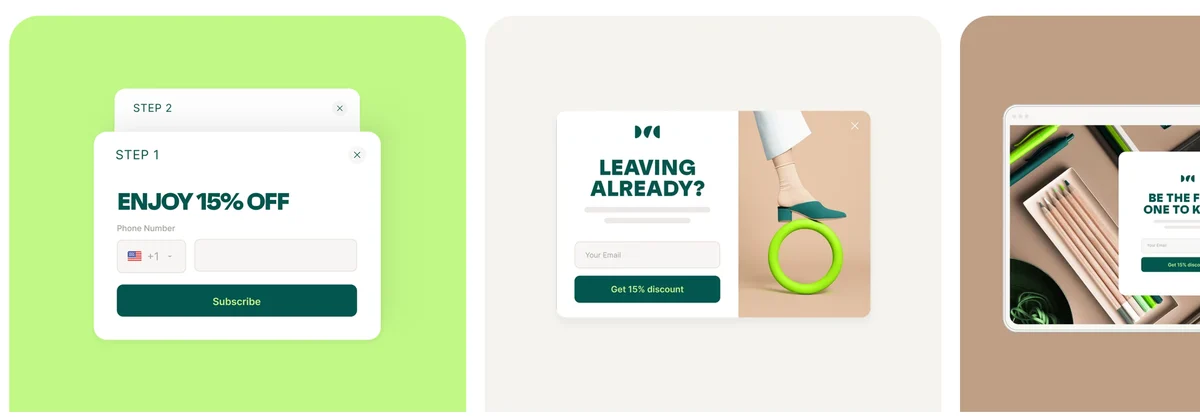
This part of my Omnisend review surprised me most. An exit intent popup with a small first order discount brought steady signups without annoying visitors, because I control timing, pages and frequency.
The multi step form is my favorite. Step one asks for the email, step two for the phone number, so email only people still sign up. Forms also collect SMS consent for TCPA and GDPR.
- Targeting rules: show forms after a delay, on exit, or only on chosen pages.
- Form A/B testing: test two designs and keep the one that converts better.
- Social Capture: turns Instagram comments and DMs into email subscribers.
- Forms AI: on paid plans, describe a form and it builds the design and copy for you.
What this means: you can drop your separate popup app. Omnisend forms connect straight to your flows, so a new subscriber gets the welcome series within seconds.
Segmentation and Personalization in Omnisend
Omnisend segments contacts by shopping history, engagement and profile data, and you can create unlimited segments on every plan.
This is the quiet strength of the tool. I can build a segment like “bought twice but ignored the last three emails” in minutes, and it updates on its own as behavior changes.
- Customer lifecycle stages: a visual map from new subscriber to loyal VIP and at risk buyer.
- AI segment builder: type what you want in plain words and it builds the segment.
- Live view: see what visitors are browsing on your store right now.
- Ad audience sync: push segments to Facebook and Google ads for retargeting.
For deeper personalization, dynamic content blocks and the personalized product recommender pick products for each shopper. These are built into Pro and sold as add ons on Standard, starting from $5/mo each.
What this means: good segments drive better open rates. My Omnisend review advice is to spend week two building a few core segments.
My Segmentation Tip: Start with three segments only: recent buyers, people who never bought, and lapsed customers. Send them different offers for a month before you build anything fancier.
SMS and Web Push Notifications in Omnisend
SMS and MMS come with the Pro plan through prepaid credits starting at $0.007 per text for high volume US sends, while web push is unlimited on every paid plan.
I added SMS to my cart recovery flow after the email steps. Email goes first because it’s cheap, and the text only reaches people who still haven’t checked out. Quiet hours and frequency caps stop texts at night, and replies land inside Omnisend.
SMS pricing depends on the country and how much credit you buy each month. Here are the current US rates per SMS:
| Monthly SMS Credit | Price per SMS (US) |
|---|---|
| $10,000 and above | $0.007 |
| $1,000 to $9,999.99 | $0.008 |
| $50 to $999.99 | $0.0085 |
| $10 to $49.99 | $0.009 |
MMS works for US and Canada numbers only, while SMS works globally. Web push is the bonus channel: shoppers opt in with one click and get cart, restock and sale alerts.
What this means: SMS costs extra on top of the plan, so my Omnisend review tip is to add it to your best flows first. Cart recovery and shipping updates usually earn their texting cost; mass promos need more care.
Omnisend Reports: Can You See What Earns Money?
Omnisend reports show revenue for every campaign, automation and channel, plus click maps, form conversion rates and the products people ordered.
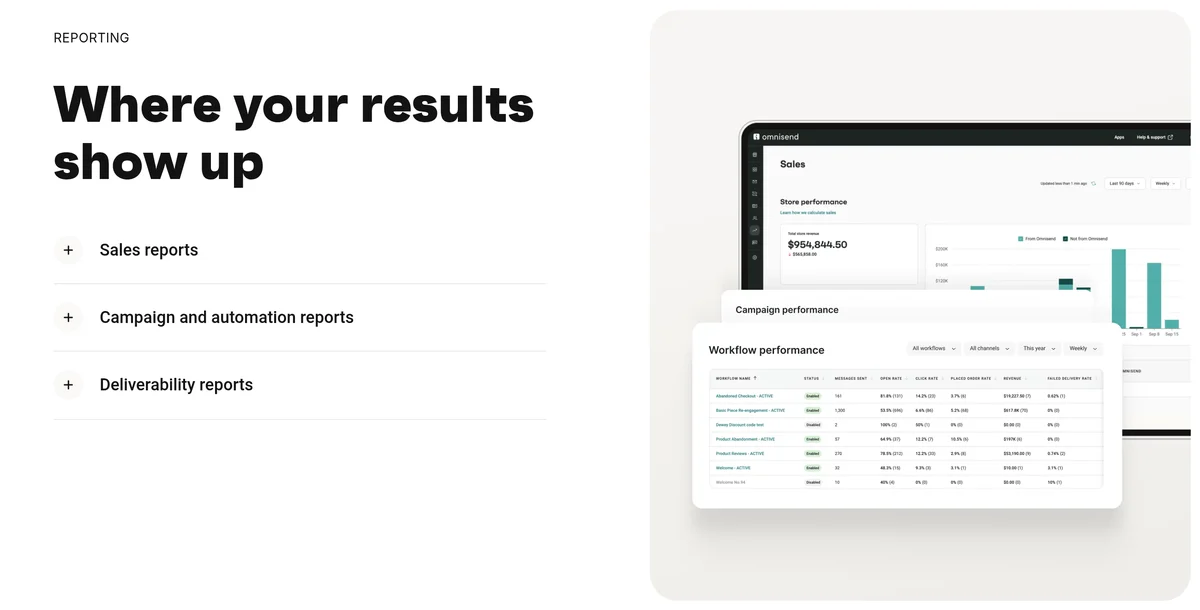
The first screen I check every Monday is the sales report. It shows revenue from campaigns versus automations and which flows did the heavy lifting. Click maps show which product got the clicks.
- Sales reporting: revenue for each campaign, flow and channel.
- Campaign clickmaps: a visual map of where subscribers clicked.
- Signup form reports: how well each form turns visitors into subscribers.
- Ordered product reporting: which products sold through your emails and texts.
Advanced reporting, which compares email and SMS side by side and ranks your best campaigns in one view, comes with the Pro plan.
What this means: the reports answer the only question that matters for a store, which is “did this email make money?” That alone is a strong point in this Omnisend review.
Omnisend AI: Agent, Forms AI and MCP
Omnisend Agent is a set of AI tools inside the app that writes subject lines and copy, builds forms, answers questions about your data and, on Pro, picks products and send times for each contact.
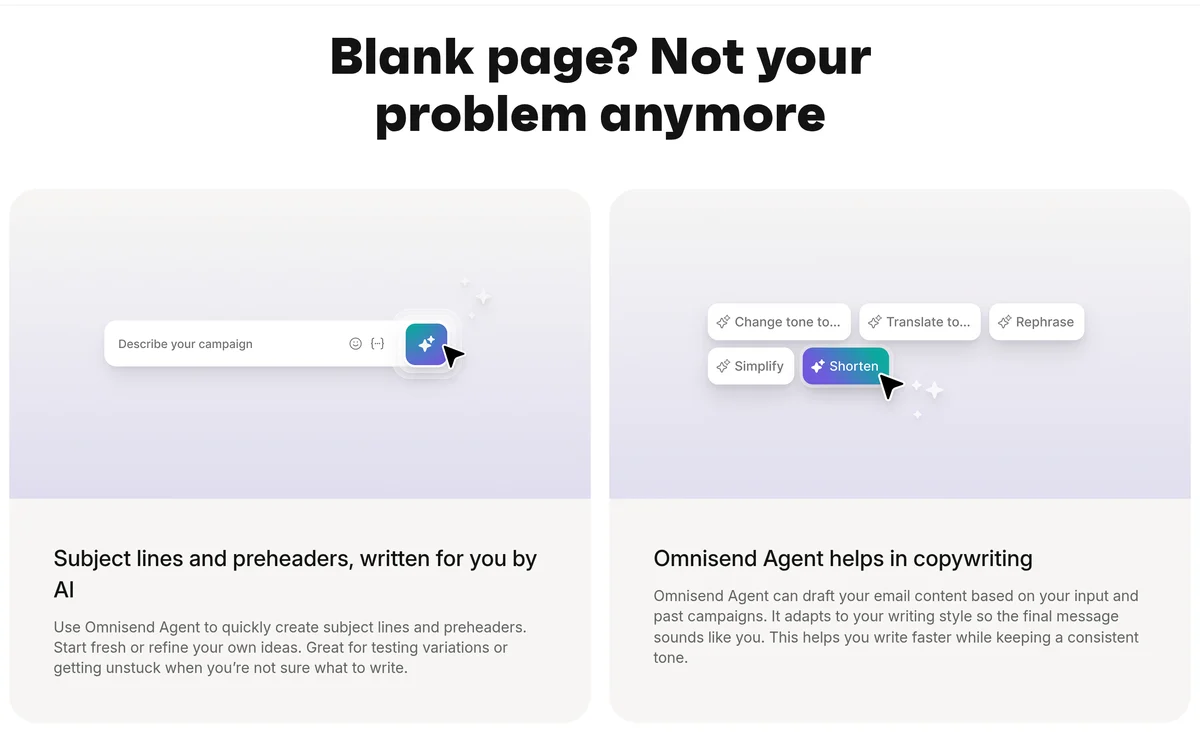
For this Omnisend review I used the AI mostly for subject lines. I give it the offer, ask for ten options, and pick two to A/B test.
| Plan | AI Tools Included |
|---|---|
| Pro | Agent Pro with 5 tools: Forms, Chat, Dynamic content, Product recommender, Personalized sending time |
| Standard | Omnisend Agent with 2 tools: Forms and Chat |
Omnisend MCP is included on every plan. It connects your account to AI assistants like ChatGPT and Claude, so you can check performance, draft campaigns and manage segments without opening the dashboard.
What this means: the AI saves time but doesn’t replace your own offer and voice. Treat it as a fast first draft.
Omnisend for Shopify: How the Setup Feels
Omnisend for Shopify installs as an app, syncs your products, customers and orders, and turns on store based flows within minutes.
Setting up Omnisend for Shopify took me less time than picking template colors. I installed the app, approved the connection, and products and past customers synced right away. If you want to see why Shopify stores need strong email, my Shopify statistics post shows how big that market has become.
WooCommerce, BigCommerce, Wix, Ecwid and Shoplazza stores get native connections too, and custom stores can use the API.
What this means: for Shopify and WooCommerce stores, this Omnisend review found one of the easiest setups around, with no developer needed.
Omnisend Pricing 2026: Plans, Limits and Real Costs
Omnisend pricing starts with a $0 Free plan, Standard from $16/mo and Pro from $59/mo, and the price grows with the number of contacts you send to.
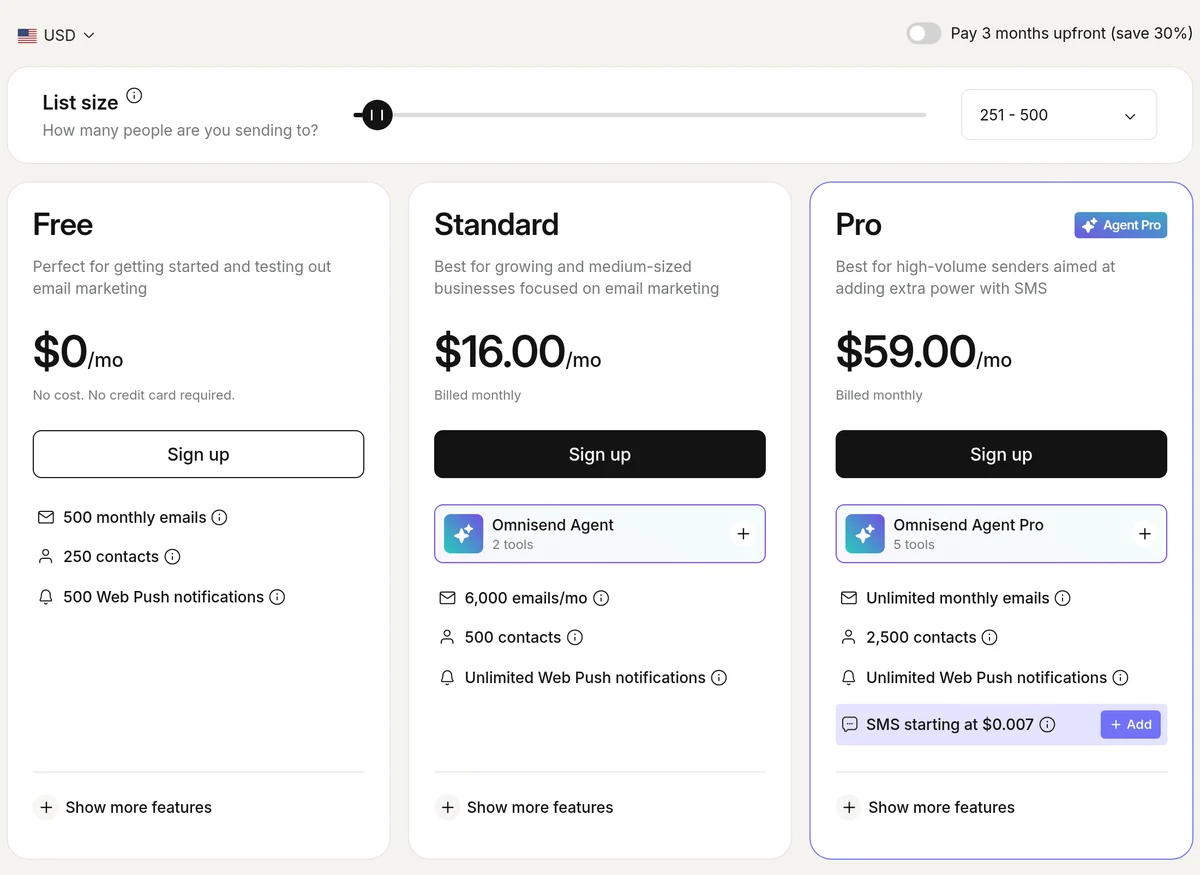
Free
$0/mo
No credit card needed
- 500 emails per month
- 250 contacts
- 500 web push notifications
- Prebuilt ecommerce workflows
- Omnisend badge on emails
My pick
Standard
$16/mo
For up to 500 contacts, billed monthly
- Emails up to 12x your list size
- Unlimited web push
- Omnisend Agent with 2 AI tools
- Remove Omnisend branding
- Add ons from $5/mo
Best for SMS
Pro
$59/mo
For up to 2,500 contacts, billed monthly
- Unlimited emails (fair use)
- SMS and MMS from $0.007/SMS
- Advanced reporting
- Agent Pro with 5 AI tools
- Account expert at $400+/mo spend
Custom
Let’s talk
For lists above 150,000 contacts
- Custom contact amount
- Unlimited emails and push
- Tailored pricing offer
- Free migration
- 24/7 support
Your bill depends on billable contacts, which means subscribers plus non subscribers who received automated messages. Unsubscribed contacts aren’t billed. Here is what monthly billing looks like as your list grows:
| Contacts | Standard (monthly) | Pro (monthly) |
|---|---|---|
| 50,000 | $413/mo | $715/mo |
| 25,000 | $282/mo | $400/mo |
| 10,000 | $132/mo | $150/mo |
| 5,000 | $81/mo | $90/mo |
| 2,500 | $44/mo | $59/mo |
| 1,000 | $20/mo | $59/mo |
| 500 | $16/mo | $59/mo |
What this means: at 2,500 contacts, Pro costs only $15 more than Standard and adds unlimited sends, SMS access and the full Agent Pro tools. For a plan by plan breakdown, read my Omnisend pricing guide.
Costs to Watch Before You Pay
SMS credits, Standard add ons and fast list growth are the three things that push the real bill above the sticker price.
| Extra Cost | Price | Who Needs It |
|---|---|---|
| SMS credits (Pro) | From $10/mo | Stores adding text messages |
| Personalized content add on | From $5/mo | Standard users who want product picks |
| Personalized sending time add on | From $5/mo | Standard users with global lists |
Omnisend also runs offers where paying three months upfront takes 30% off those months, so check before you pay. Above 150,000 contacts pricing is custom, and accounts spending $400/mo or more get a free account expert.
What this means: budget for your list size six months from now, not today. A fast growing store moves up the price tiers quicker than expected.
Omnisend Free Plan: What You Get Before You Pay
The Omnisend free plan costs $0 forever, needs no credit card, and lets you send 500 emails a month to up to 250 contacts with core automations included.
There’s no time limit on the free plan, so it works as an open ended trial. You get prebuilt ecommerce workflows, segmentation, A/B testing, popups, landing pages, 500 web push notifications a month and 24/7 support. The catch is the “Powered by Omnisend” badge on emails and forms, and the low sending cap.
My advice from this Omnisend review: use the free plan to connect your store, build the welcome and cart flows, and design your forms. When your list passes 250 contacts, you’ll have real numbers to judge the upgrade. If you want step by step signup help, my Omnisend free trial guide walks through it. You can also open your free Omnisend account here and follow along.
What this means: the free plan is generous for testing, but a growing store outgrows it within weeks. Plan the upgrade before your first big campaign.
Omnisend Support and Free Migration
Omnisend offers 24/7 live chat and email support on every plan, including Free, plus a free migration service that moves your flows, lists and templates in about five days.
Support is why I stopped worrying about breaking things. When a flow trigger didn’t fire on a test store, I opened live chat late at night and got an answer within minutes, on a basic plan.
Free migration is a big deal if you’re leaving another platform. Their team rebuilds your automations, segments, forms and templates for you.
Before You Migrate: Export your full contact list and note your top five flows with their timing. Even with free migration, having your own copy makes the final check much faster.
What this means: my Omnisend review rates support as a real strength, and switching platforms costs you time, not money.
How I Would Set Up Omnisend in Your First 7 Days
A simple seven day plan gets your core flows live and earning before you decide on a paid plan.
- Day 1: connect your store, sync products and customers, and set up your sender domain.
- Day 2: launch the welcome series with a small first order offer.
- Day 3: turn on abandoned cart and browse abandonment flows.
- Day 4: publish an exit intent popup and a multi step form for email and SMS.
- Day 5: build three segments: recent buyers, never bought and lapsed customers.
- Day 6: send your first campaign with a product block and a unique discount code.
- Day 7: check the sales report, compare flows, and pick your plan.
What this means: by day seven you’ll know if Omnisend is worth it for your store, based on real revenue instead of a feature list.
Is Omnisend Worth It in 2026? My Honest Take
Yes, Omnisend is worth it for ecommerce stores that want email, SMS and push automations in one place at a fair price; no, if you don’t run a store.
My honest Omnisend review verdict is simple. It nails the store jobs: cart recovery, product emails, purchase based segments and revenue reports. Pricing stays friendly for small and mid sized lists.
| Your Situation | Is Omnisend Worth It? | Plan I’d Pick |
|---|---|---|
| Store with 2,500+ contacts using SMS | Yes | Pro |
| Growing store focused on email | Yes | Standard |
| New store under 250 contacts | Yes, start free | Free |
| Blogger or B2B newsletter | No | Pick another tool |
What this means: match the plan to your list size and channels. If you’ll use SMS or send often, Pro gives the best value per dollar once you pass 2,500 contacts.
Omnisend Pros and Cons: My Omnisend Review Summary
Pros
- Free plan with core ecommerce automations and no card needed
- Email, SMS and web push work together in one automation
- Product blocks and unique discount codes sync with your store
- Unlimited segments built on shopping and browsing behavior
- Revenue reports for every campaign, flow and channel
- 24/7 live chat and email support on every plan
Cons
- SMS and MMS are only available on the Pro plan
- Prices rise quickly as your contact list grows
- Free plan emails carry the Omnisend badge
Weighing the Omnisend pros and cons, this Omnisend review lands on a clear yes for online stores. The pros are store data, automations and support; the cons are mostly about cost at scale.
Quick Links
- Compare another email tool in my AWeber Review
- For creators, read my ConvertKit Review
- Build funnels and email together with my Systeme.io Review
- Running a WordPress store? See my WooCommerce Review
- Manage customer data with my HubSpot CRM Review
Frequently Asked Questions About Omnisend Review
Yes, Omnisend is worth it for ecommerce stores. It combines email, SMS and web push automations with store data, product blocks and revenue reports. In my Omnisend review, the main reason to skip it is if you don't sell through an online store.
Omnisend costs $0 on the Free plan, from $16/mo on Standard and from $59/mo on Pro with monthly billing. The price rises with your contact count, for example $81/mo on Standard at 5,000 contacts. Above 150,000 contacts, pricing is custom.
Yes. The Omnisend free plan lets you send 500 emails and 500 web push notifications a month to up to 250 contacts. It includes prebuilt workflows, segmentation, forms and 24/7 support, with no credit card and no time limit.
Omnisend doesn't run a classic time limited trial. The Free plan works as an open ended trial, so you can connect your store, build flows and test forms before you upgrade to a paid plan.
No. SMS and MMS are part of the Pro plan. You buy SMS credits each month, and US rates start at $0.009 per SMS for small amounts and drop to $0.007 at high volume.
Standard gives you email sends up to 12 times your list size, unlimited web push and two AI tools. Pro adds unlimited emails under fair use, SMS and MMS, advanced reporting and five Agent Pro tools, including the product recommender.
Yes. Omnisend for Shopify installs as an app and syncs products, customers and orders. It also connects natively with WooCommerce, BigCommerce, Wix and other platforms, and offers an API for custom stores.
Omnisend bills for subscribers plus non subscribers who received automated messages, such as order confirmations. Unsubscribed contacts are not billed, so cleaning your list regularly keeps the monthly price down.
Yes. The prebuilt workflows, drag and drop builder and 24/7 chat support make it easy to start. Most beginners can launch a welcome series and an abandoned cart flow on their first day.
Conclusion: My Final Omnisend Review Verdict
This Omnisend review comes down to one line: if you run an online store, Omnisend is one of the easiest ways to turn email, SMS and push into steady sales. The automations, product blocks, segments and revenue reports all work with your store data from day one.
Start on the free plan, follow my seven day setup, and watch the sales report. When your list grows past 250 contacts, pick your Omnisend plan here and let the flows keep selling for you.
