LitExtension Review 2026: What Makes It a Must-Have Tool for Your Store? 🔥
Last Updated on: June 24, 2026 by Jitendra vaswani | Fact Checked
Affiliate disclosure: In full transparency – some of the links on our website are affiliate links, if you use them to make a purchase we will earn a commission at no additional cost for you (none whatsoever!).
LitExtension is a user-friendly, reliable tool for migrating online stores across platforms. It offers broad compatibility, excellent customer support, and efficient handling of data. With customization options and minimal downtime, it’s a solid choice for seamless eCommerce migrations.
Join me as I take you through my experience with LitExtension and help you decide if it’s the right solution for your e-commerce needs.
Don’t let a fast-approaching deadline stress you out. With LitExtension, you won’t have to worry about moving your whole store from one shopping cart to another.
Are you tired of the difficulty of moving your customers, goods, and orders to a new shopping cart? Stop looking.
Feel the power of LitExtension and move your store easily and quickly in just three steps. Don’t worry about technology problems and save valuable time at the same time.
Get ready for an honest and thorough LitExtension Review that will go into detail about the great migration services LitExtension offers.
Bottom Line Upfront:
When it comes to user experience, litextntion is the most effective online shopping cart solution currently on the market, which was made just for moving products and customers from old shopping carts. With LitExtension, the process is broken down into three easy steps, giving you more time to focus on what really matters: growing your business. LitExtension is a top-tier service that gives merchants and eCommerce pros the best possible shopping cart migration experience.
The key feature of LitExtension is that it automates the process of migration between two different platforms. So, what exactly is LitExtension?
It is one of the best platforms for migrating your e-commerce site. Isn’t it great and way too flexible for the online business to run and make it a wider platform?
Flexibility gives those who own and rely on these E-commerce platforms the freedom to do so. When it comes to digital flexibility, one needs nothing.
LitExtension is one of the renowned worldwide shopping cart migration services for various merchants and e-commerce experts.
It can only be possible with dedicated expertise within the firm, and LitExtension ensures they have the best, which ultimately makes the work easier.
LitExtension has the greatest features and is of utmost usefulness. LitExtension works on its profound features and makes it the best working migration site for experts.
Mentioned below are some of the important and interesting features of LitExtension.
1) Fully Automated
LitExtension is a fully automated site with minimal human involvement and interference. This makes work look smart and easy to handle.
2) Id Retention
When migrating a whole domain, people often worry about what will be migrated and how much.
LitExtension ensures that all content from your domain on the previous site is fully migrated to the next site, including your ID retention, which is like a world-winning moment.
3) Free Demo
Migrating your whole domain is a risky move. What happens when you have already paid money but are not satisfied or have missed important information?
LitExtension does not reach that level, as it offers a free demo migration, allowing you to assess its functionality and the services it provides easily.
4) Customer Password Migration
Isn’t it great when even the smallest piece of information leads to another domain or site and includes whatever you have always wanted?
You need your password to migrate from the previous domain to the current domain.
The password has been securely migrated, allowing you to continue working as before, but on a different site.
5) Smart Update
Upgrading and updating are important aspects of the internet. During hectic work, you might sometimes forget to update the software you are using.
6) Highly Secured Data
Litextension gives you the best-secured data.
It serves as a secure storage area where you can rely on to keep your data safe. It is a trustworthy platform for securely storing data and maintaining it untouched.
Shopping cart migration requires significant effort and focus. The steps have to be carried out meticulously to ensure a perfect outcome.
Even for experts, it is absolutely not a cakewalk. Surprisingly, with LitExtension, the migration process has become super easy.
Even if the technology doesn’t fascinate you, you can still accomplish the tasks you want. With just a few clicks, your entities are transferred from the source to the target cart.
Let’s understand migration with LitExtension in a step-by-step process.
1) Specify Your Target Store
To execute a migration, a target store for the data transfer must be selected.
2) Take a Backup of Your Source Store Data
LitExtension duplicates your data from one shopping cart to another. Your source store data will not undergo any changes during the migration process.
3) Migrate with LitExtension
Create an account with LitExtension. You can either register for a new account or sign in. You can even use your existing Google or Facebook account to log in.
Navigate to the migration page. At the top right corner, click the Create New Emigration button.
Select the source cart type and enter the URL in the blank bar. Follow the tutorial video or wizard information to get an idea of how to receive your password and API information.
Fill in the required information in the form.
Select the target store and enter its URL in the blank bar. Click on the LitExtension connector to download it. Derive the zip file and upload the connector to the target store’s root folder.
Click Next to configure migration. Then, specify the entities you wish to migrate, including customers, orders, and products.
Either all of them are selected together, or each is selected individually.
4) After the Migration is Complete, Check your Store
You can check the migrated data in your store after the process is completed. However, across platforms, the process of checking data varies.
5) Carry out Recent Data Migration
To ensure the migration does not impact your business’s performance, LitExtension keeps the source store active during and after the migration.
There are three steps to doing it with LitExtension:
Visit your LitExtension account.
Choose the additional entities you need to transfer from the migration list.
Click the “ recent migration” button and follow the steps you practiced in order to set up the whole process.
6) Change DNS and Switch Domain
After the migration is complete, the DNS needs to be updated and the domain switched to the new store. If you are a beginner, pay a single fee, and LitExtension will provide you with this service, too.
LitExtension Pricing: How Much Does LitExtension Cost?
Migration Setup
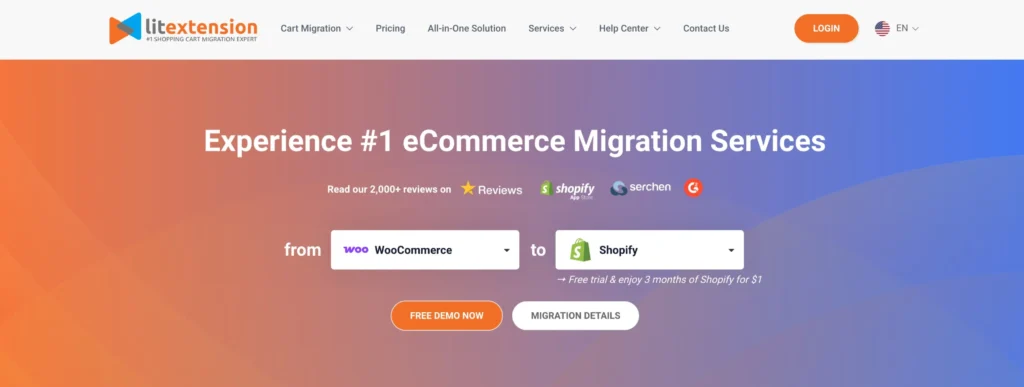
Source Store: WooCommerce
Target Store: Shopify
Includes a free trial and 1 month of Shopify for $1
Migration Scope:
100 Products
100 Orders
100 Customers
0 Blog Posts
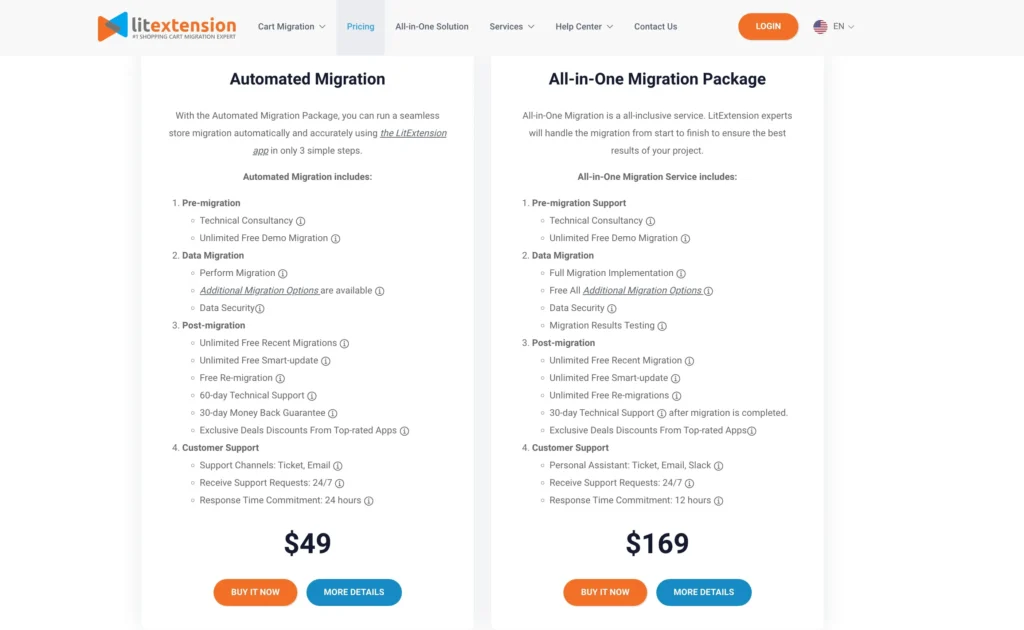
1. Automated Migration Package – $49
A simple and affordable option for store owners who want to handle migration themselves using the LitExtension app. Complete your store transfer in just a few clicks.
Included Features:
Pre-Migration
Technical consultation
Unlimited free demo migrations
Data Migration
Automatic data transfer via LitExtension
Optional additional migration features
Secure data handling and protection
Post-Migration
Unlimited recent migrations
Unlimited smart updates
Free re-migrations if needed
60 days of technical support
30-day money-back guarantee
Access to exclusive partner discounts
Customer Support
Support via ticket and email
Available 24/7
Response within 24 hours
2. All-in-One Migration Package – $169
A fully managed solution handled by LitExtension experts. Ideal for businesses that want a worry-free, professional migration service from start to finish.
Included Features:
Pre-Migration Support
Technical consultation
Unlimited free demo migrations
Data Migration
Complete implementation by the LitExtension team
All optional features included
Secure, accurate data transfer
Thorough results testing
Post-Migration
Unlimited recent migrations
Unlimited smart updates
Unlimited free re-migrations
30 days of post-migration technical support
Access to exclusive partner discounts
Customer Support
Personal migration assistant (via ticket, email, or Slack)
Efficiently transfers store data to new e-commerce platforms.
Compatible with a broad array of platforms and supports customized migrations.
Automated process reduces downtime and minimizes operational disruption.
The intuitive interface makes the migration process straightforward.
Offers a free demo to try before committing.
Provides comprehensive logs and reports for clear tracking.
Cons:
More complex migrations might need further customization.
Customer support response times vary.
Possibility of data mismatches in highly tailored setups.
FAQs
Can I migrate to the trial store before a real store?
Yes, you can do that. After migrating to the trial store, you can re-migrate to the real store. Make sure that you store the trial and real store in one server. While you are re-migrating, three things cannot be changed: The Source cart type, The Target cart type The Source cart URL
What methods of payment are supported by LitExtension?
LitExtension currently accepts 8 payment methods. They include PayPal, Bitcoin, Skrill, Bank Transfer, Bitcoin Cash, Tether USD, and Western Union. There is a LitExtension Payment Guide, which you can refer to to get other details regarding the payment.
Do I need to pay an additional charge after purchasing a product?
No. The extra sum will not be charged to purchase their service. A demo is available for free. You can carry out a migration of products, orders, and various entities from your store to the shopping cart you wish to migrate them to during the demo to get familiar with the procedure.
What is FTP?
FTP is File Transfer Protocol is an internet protocol that helps to transfer files from one system to another across the internet.
Is LitExtension safe?
LitExtension offers a safe way to transfer your store. The entire process is seamless, with no downtime or disruption during the move-in date and time on day one of installation. In addition, you will still be able to receive new customers while completing necessary tasks at your new location - it’s almost too easy being an entrepreneur when Lit extensions have done all this work for you.
LitExtension is the best example of smart software that makes data transfer easier. Migration has always been hard, but LitExtension makes it easy.
Leave your worries behind. The litExtension team, comprising technical experts and dedicated customer support, will take care of everything.
LitExtension ensures every customer has a good time with its easy-to-use interface.
Rest assured that our software not only automates shopping cart migration as promised but also prioritizes the security of your important data throughout the process.
Don’t just take our word for it; many users have compared LitExtension to its competitors and found it better in every way.
LitExtension is also great because it is fast, works well, and is very affordable. You can try our service for free for three months and get your money back within 30 days. It’s easy to decide to subscribe to LitExtension.
It’s important to note that even a small investment can yield significant benefits and a substantial return on your money. If you choose LitExtension today, you can start a smoother data migration journey.
Jitendra Vaswani is a crazy digital marketer & professional blogger from India. Experienced with a wide range of SEO, SMO, SEM, and various digital projects. Self driven Entrepreneur, Web Consultant & Founder of Digital Marketing Agency DigiExe& WordPress Plugin SchemaNinja SchemaNinja & Marketing blog BloggersIdeas . He is a successful online marketer & award-winning digital marketing consultant. He has been featured on HuffingtonPost, BusinessWorld, YourStory, Payoneer, Lifehacker & other leading publications as a successful blogger & digital marketer. Check out his latest Portfolio( Jitendra.co). Find him on Twitter, & Facebook.