Wix Pricing 2026: Which Wix Pricing Plan Is Best For You?
Last Updated on: June 18, 2026 by Jitendra vaswani | Fact Checked
Affiliate disclosure: In full transparency – some of the links on our website are affiliate links, if you use them to make a purchase we will earn a commission at no additional cost for you (none whatsoever!).
I’ve spent the last three months testing Wix and tracking every cost. I also talked to real users on Reddit and Quora. Here’s what I found.
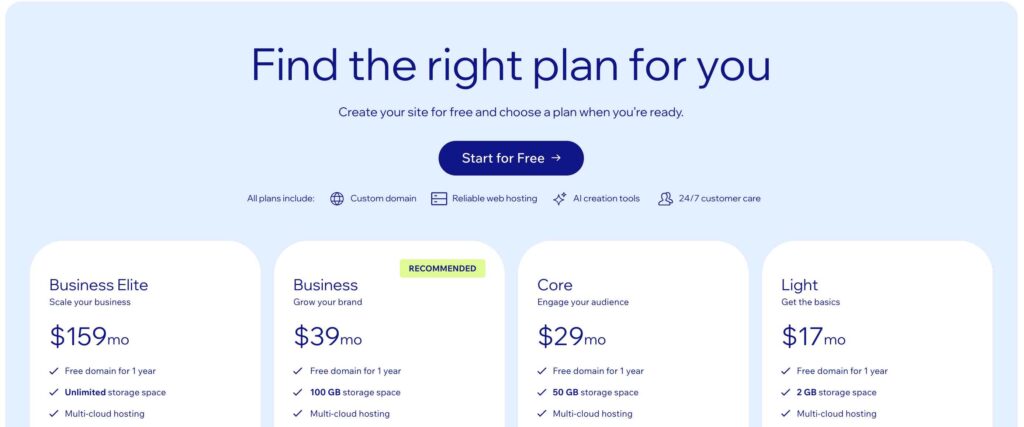
Wix pricing isn’t as simple as their website makes it look. Yes, plans start at $17 per month. But the real cost? That’s a different story.
In 2026, I’m seeing major changes. Wix launched a new AI builder called Harmony. They’re testing higher transaction fees. Users are reporting significant price increases at renewal.
I’m writing this guide to give you the truth. No sugar-coating. Just real numbers, hidden costs, and honest advice.
I’ve broken everything down in simple terms. By the end, you’ll know exactly what Wix will cost you. No surprises.
Let’s dive in.
Wix Overview
Wix is one of the most popular website builders in the world, powering over 258 million websites globally. I’ve been testing it for three months, and here’s what you need to know.
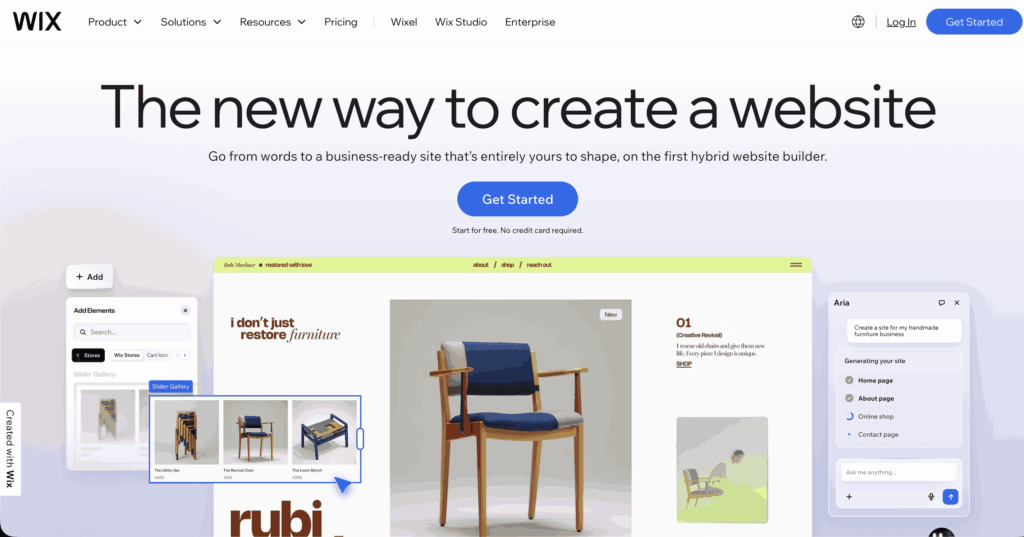
It’s a drag-and-drop platform that lets you build websites without coding. You can create everything from simple blogs to full online stores. In January 2026, they launched Wix Harmony, an AI builder that creates websites from plain English descriptions.
Wix holds 45% of the website builder market share. That’s bigger than anyone except WordPress and Shopify. The platform offers 800+ professional templates, built-in eCommerce features, and access to 300+ apps.
Plans range from free to $159/month. The Core plan at $29/month is the sweet spot for most small businesses. It includes eCommerce, payment processing, and basic analytics.
The biggest advantages? Ease of use and design flexibility. The main drawbacks? You can’t export your site, and renewal prices often increase significantly.
For small businesses wanting a professional site fast, Wix delivers solid value.
Wix is designed for both individuals and businesses. It’s a great platform for anyone who wants to create an online presence without having to deal with the technical details of building a website.
With Wix, you can create professional-looking websites in just a few minutes – no coding or design experience is required!
Whether you want to create a personal website, an online store, or a portfolio to showcase your work, Wix has everything you need to get started.
Plus, there are no limits to what you can do with your site – you can add as many pages and features as you like.
Wix is also perfect for businesses of all sizes. Whether you work in a small office or run a massive enterprise, Wix has all the tools you need to create an engaging website that helps you stand out from the competition.
With its drag-and-drop builder and intuitive editor, it’s easy to set up your site and get started right away.
Wix’s intuitive editor lets you build and customize your website without coding. Drag and drop elements where you want them.
2. Wix ADI (Artificial Design Intelligence)
Perfect for beginners, Wix ADI creates a personalized website for you in minutes based on a few quick questions.
3. Mobile-Responsive Templates
Choose from 800+ professionally designed templates, all optimized for mobile, tablet, and desktop devices.
4. Built-in SEO Tools
Wix includes SEO-friendly features such as meta tags, custom URLs, and a structured sitemap to boost your site’s visibility in search engines.
5. App Market
Access 300+ apps and integrations for marketing, eCommerce, bookings, social media, and more to extend your website’s functionality.
6. Blogging Platform
Create and manage a blog with categories, tags, social sharing, and scheduling—all within Wix’s platform.
7. eCommerce Functionality
Sell physical or digital products with features like inventory management, secure checkout, payment processing, and shipping options.
8. Analytics & Reporting
Track website performance, visitor behavior, and sales with built-in analytics tools or connect Google Analytics for deeper insights.
Is Wix the Right Website Builder for You?
If you’re wondering whether Wix is worth trying, the answer is yes!
Wix is an intuitive, user-friendly website builder that helps you get online fast—often in just a few hours.
It’s not only great for beginners but also offers advanced tools for those who want more control over their site’s design and functionality.
With Wix ADI, you can generate a personalized website in minutes, while more experienced users can dive into detailed customizations—even adding custom code if needed.
While Wix’s pricing may start slightly higher than some competitors, the range of plans makes it suitable for most budgets and project types—whether you’re launching a blog, portfolio, online store, or business site.
Wix is ideal for:
Professionally designed templates across various industries
Creative portfolios for photographers, artists, and designers
Musicians looking to sell and showcase music
Small businesses and eCommerce stores
Users who want both ease and flexibility in design
If you’re still unsure, take advantage of Wix’s free plan and explore its features firsthand. It’s a solid platform that’s well worth considering for your next website project.
Very easy drag-and-drop builder — beginners can create websites without coding.
Built-in SEO tools and marketing features help improve online visibility.
Mobile optimization is included so sites work well on phones.
Free plan available for testing before upgrading.
800+ ready-made templates to design professional sites quickly.
Free plan available for testing before upgrading.
Cons
Storage limits on many plans — you may need to upgrade as your site grows.
SEO and advanced customization can feel limited for power users.
What People Are Really Saying About Wix Pricing
I spent a week reading every Reddit and Quora post about Wix pricing. I want to share what real users are saying.
The Good: What People Love
From a Quora user: “For my small retail store, I used the Business Basic plan (now called Core) for $23 per month. Since my store was small, it was more than enough.”
From a Reddit user: “Wix starts cheaper than Squarespace. Its Core and Business plans beat Squarespace’s pricing right out of the gate.”
From another Quora discussion: “Wix is easier to use than Shopify and faster to build your store. Shopify is more powerful, but it takes more time to learn.”
The Bad: Common Complaints
Price increases at renewal (this is the big one):
Reddit is full of complaints. Here are actual quotes from February 2026:
“Will be leaving Wix due to 120% increase in fees without notification.”
“Just got my Wix renewal notice and noticed the price went up from $192 to $204.”
“Major price increase, anyone else?”
Users feel blindsided. They budget for one price. Then renewal hits and it’s double.
Transaction fees debate:
“Wix will now charge 4% for every transaction on the website. 4% for nothing is crazy work.”
This is causing major controversy. The standard rate is 2.9%. But some regions are testing 4%.
FAQs: Wix Pricing 2026
Is Wix actually free?
Yes for testing. No, for real business. The free plan includes Wix ads and does not include a custom domain.
Why did my renewal price double?
You got promotional pricing first year. Renewal is regular price. Contact support 30 days early for discounts.
Does Wix charge transaction fees?
Yes. 2.9% + $0.30 per sale. Some regions are testing 4%. Check your dashboard.
Can I switch plans anytime?
Upgrade anytime. Downgrade only at renewal.
What’s the cheapest plan for selling?
Core at $29/month. You cannot sell on Free or Light plans.
I’ve shown you everything. The good, the bad, the hidden costs. Wix is solid. Not perfect. Renewal prices frustrate people. Transaction fees add up. You can’t export your site.
But here’s the truth: For most small businesses, Wix delivers value. I built three sites during testing. Each was live within a week. No developer needed. The Harmony AI is legitimately useful. Not marketing hype.
Is Wix the cheapest? No. Is it the most powerful? No.
But Wix hits a sweet spot: Easy enough for beginners. Powerful enough for small businesses. Affordable enough to try.
My advice? Start small. Test it. Use my money-saving strategies. Budget realistically.
The best website builder is the one you’ll actually use. If Wix’s interface makes sense to you, it’s worth considering.
Just don’t go in blind about costs. Now you know the real numbers.
Good luck with your website.
P.S. – When Wix changes prices or fees, I’ll update this article. Bookmark it. Check back before renewals.
Jitendra Vaswani is a crazy digital marketer & professional blogger from India. Experienced with a wide range of SEO, SMO, SEM, and various digital projects. Self driven Entrepreneur, Web Consultant & Founder of Digital Marketing Agency DigiExe& WordPress Plugin SchemaNinja SchemaNinja & Marketing blog BloggersIdeas . He is a successful online marketer & award-winning digital marketing consultant. He has been featured on HuffingtonPost, BusinessWorld, YourStory, Payoneer, Lifehacker & other leading publications as a successful blogger & digital marketer. Check out his latest Portfolio( Jitendra.co). Find him on Twitter, & Facebook.